
How-to guides
How to Build an Ecommerce Sales Funnel That Turns Visitors Into Customers
Learn how to build an ecommerce sales funnel that turns visitors into buyers. Steps for landing pages, offers, follow-up and testing.
Leadpages data
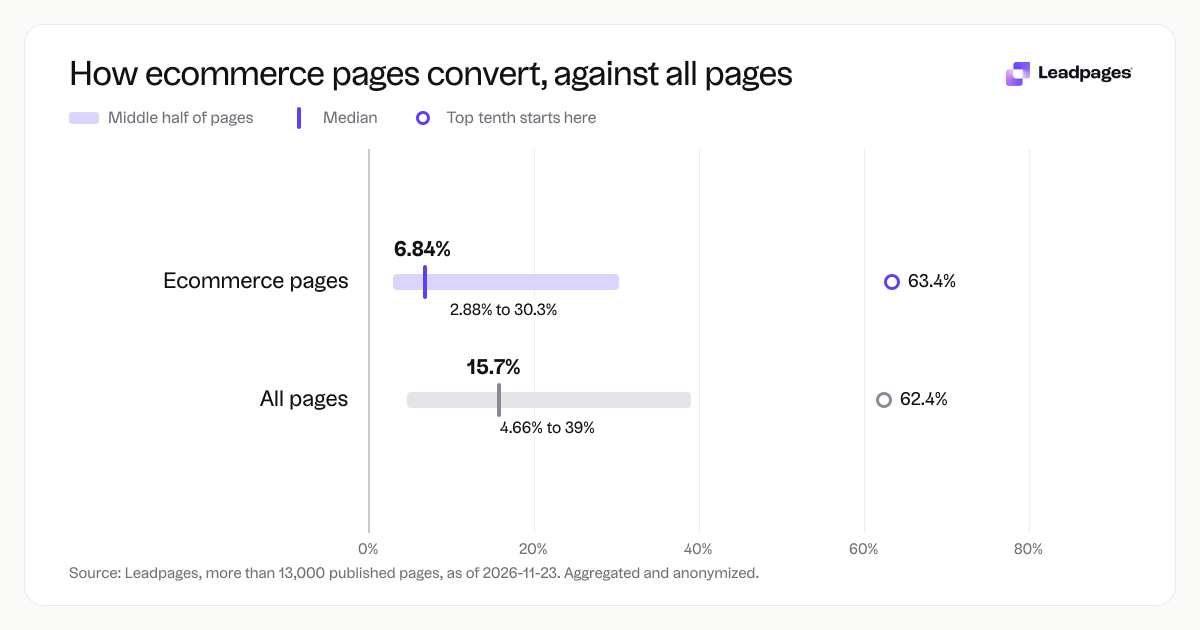
Conversion rates for ecommerce published with Leadpages, compared with all pages
more than 13,000 published pagesAs of November 23, 2026
6.84%
Median conversion rate, ecommerce pages
2.88%
Bottom quarter converts below, ecommerce pages
30.3%
Top quarter converts above, ecommerce pages
| Measure | Value |
|---|---|
| Median conversion rate, ecommerce pages | 6.84% |
| Bottom quarter converts below, ecommerce pages | 2.88% |
| Top quarter converts above, ecommerce pages | 30.3% |
| Top tenth converts above, ecommerce pages | 63.4% |
| Share converting at 10% or better, ecommerce pages | 41.2% |
| Median conversion rate, all pages | 15.7% |
| Bottom quarter converts below, all pages | 4.66% |
| Top quarter converts above, all pages | 39% |
| Top tenth converts above, all pages | 62.4% |
| Share converting at 10% or better, all pages | 59.9% |
Median conversion rate, ecommerce pages
Bottom quarter converts below, ecommerce pages
Top quarter converts above, ecommerce pages
Top tenth converts above, ecommerce pages
Share converting at 10% or better, ecommerce pages
Median conversion rate, all pages
Bottom quarter converts below, all pages
Top quarter converts above, all pages
Top tenth converts above, all pages
Share converting at 10% or better, all pages
Based on more than 13,000 published pages. As of November 23, 2026.
The short answer
An ecommerce sales funnel is the path a visitor follows from first click to purchase. Send traffic to a page that matches the ad, email or social post. Keep the page focused on one offer, capture an email when the visitor is not ready to buy, then follow up with a short message sequence. The funnel works when each step gives one clear next action.
Across pages published with Leadpages, ecommerce pages have a median conversion rate of 6.84%. The bottom quarter converts below 2.88%, and the top quarter converts above 30.3%. That spread is why the page, offer and follow-up matter as much as the product.
Build your ecommerce sales funnel step by step
Use these steps in order. They work with any landing page tool, and the notes show where Leadpages has a feature that helps.
1. Match the page to the traffic source
A visitor who clicks a Google Shopping ad for a specific product should land on a page for that product, not your homepage. A visitor from an Instagram story about a first-order discount should see that discount in the first screen. Before you build, answer one question: what did this person click, and what did that ad or email promise?
Create a separate page for each major traffic source when the offer is different. If you run paid social for a free shipping offer, repeat the phrase "free shipping on your first order" on the page. If you email previous customers about a restock, show the restocked product first. Use a dedicated landing page rather than a general store page. You can start from a landing page template and customize it for one offer.
2. Choose the goal: buy now or capture email
Sales funnels for ecommerce work best when each page has one goal. A sales funnel for ecommerce usually splits into two jobs. Some pages send a visitor straight to a checkout or product page. Other pages collect an email address so you can sell over time.
Use a buy-now page when the product is low priced, well known and easy to decide on. For example, a coffee brand selling a single bag of beans can send cold traffic to a page with one product, one image and an "Add to cart" button. Use an email capture page when the product needs more explanation, costs more, or when the visitor is not ready to buy today. A furniture shop could offer a free measurement guide in exchange for an email, then follow up with room examples and a discount.
Leadpages includes lead capture forms for adding email capture to a landing page.
3. Write a headline around the visitor's goal
State the outcome or the offer, not just the store name. "Get free shipping on your first order" beats "Welcome to our store." "The ergonomic desk chair for small offices" beats "New arrivals."
Keep the headline under about 12 words. Reuse the same phrase from the ad or email in the headline. Then add one sentence to remove the biggest hesitation, such as "Free returns within 30 days" or "Ships in 1 business day." You can test headline options with the free headline analyzer.
4. Show the product and the proof
On a product-focused funnel page, show the product from multiple angles. List the price, sizes, colors and shipping details, and place the buy button near the main image. On an email capture page, show what the visitor gets, such as a discount code, a guide or early access.
Add proof near the call to action. Reviews, star ratings, customer photos, guarantees and return policies all reduce risk. For example, a skincare brand could show a customer photo with a short quote under the email form. A jewelry business could place "60-day returns" next to the buy button.
5. Use one call to action, repeated
Pick one primary action for the page. If the goal is a sale, use "Add to cart" or "Buy now." If the goal is an email, use "Get my code" or "Send me the guide." Do not link to your full menu, blog or social profiles on this page.
Repeat the same button on a longer page: near the top, after the product details, and at the bottom. The visitor should not have to scroll back up to act. For help with wording, try the free call-to-action generator.
6. Keep the form short
For an email capture page, ask for first name and email address. If you need phone numbers for SMS follow-up, ask only for a phone number and skip other fields. Every extra field is another reason to leave. The button should repeat the offer, such as "Get my discount code."
Use the lead capture forms in Leadpages to build the form in the same editor. Connect the form to your email platform so the first message sends automatically.
7. Deliver the follow-up sequence
Most visitors will not buy on the first visit. Your funnel should continue after the form is submitted or after the first click. For email subscribers, set up at least three messages: deliver the promised code or guide immediately, send a reminder within 24 hours, then send social proof or answers to common questions on day three or four. For abandoned carts, use your store's email platform to send a reminder with a link back to the cart.
Keep each message short and give one next action. The first message should deliver the offer. Every later message should lead back to the same product page or checkout link.
8. Test the page before scaling traffic
Start with a small budget or a small email segment. Watch two numbers: how many people visit and how many complete the goal. If the page gets traffic but no signups or sales, change one element at a time, starting with the headline, then the offer, then the form or button. Use an A/B test when you have enough traffic to compare two versions.
Across pages published with Leadpages, ecommerce pages have a median conversion rate of 6.84%. The bottom quarter converts below 2.88%, the top quarter converts above 30.3%, and the top tenth converts above 63.4%. The share converting at the double-digit threshold is 41.2%. A page that looks finished can still sit in the bottom quarter. Testing is the practical way to find which version raises performance.
Leadpages has A/B testing for pages, and you can check the significance of a test with the free A/B test calculator.
Common problems and how to fix them
- Sending all traffic to your homepage. The homepage is built for browsing, not for one promise. Send each ad or email to a dedicated page that matches the message.
- Too many links or menus. A visitor on a funnel page should see one way forward. Remove navigation, footer links and sidebars.
- The ad and the page do not match. If the ad says "a discount on your first order" and the page says "browse new arrivals," the visitor feels lost. Use the same words in the ad headline and page headline.
- Asking for too much information. Long forms reduce submissions. Use first name and email, and add more fields only if you use them for follow-up.
- No follow-up after signup. If a visitor gives you an email and hears nothing, the funnel stops. Send the promised item immediately.
- Slow page speed. Compress product images and remove bulky widgets. A slow page loses visitors before the headline is read. You can run the page through the free landing page analyzer to catch issues that hurt conversions.
- Wrong goal for the traffic. Cold paid social traffic may not buy a high-ticket product on the first click. Capture the email first if you need time to educate and follow up.
What to do next
Start with one offer and one traffic source. Pick a product with a clear audience, write a specific headline, build a simple landing page, and connect a short email follow-up. Do not try to build five funnels at once. Get one version working, then reuse the structure for other products.
Run your page through the free landing page analyzer before you send traffic. Then set up a small test campaign and check the conversion rate after a few days. If the page underperforms, change the headline first, then the offer, then the button.
If you want a faster start, use the Leadpages for ecommerce page for templates and examples.
How we measured this
The figures in this guide come from pages published with Leadpages. The sample is more than 13,000 published pages. Aggregated and anonymized; as of 2026-11-23. We report the median conversion rate, bottom quarter, top quarter, top tenth, and share converting at the double-digit threshold for ecommerce pages.
Create a free account and start building free.