
How-to guides
How to Set Up a Google Ads Lead Form to Get More Leads
Learn how to create a Google Ads lead form asset to capture leads directly from your ads. Step-by-step setup, plus data-backed tips on how many form fields to use.

A Google Ads lead form is an asset that appears with your search, display, or video ad. It lets someone submit their name, email, phone number, and other details without leaving Google. You can also send ad clicks to a landing page with a lead form, which gives you more control.
Leadpages data
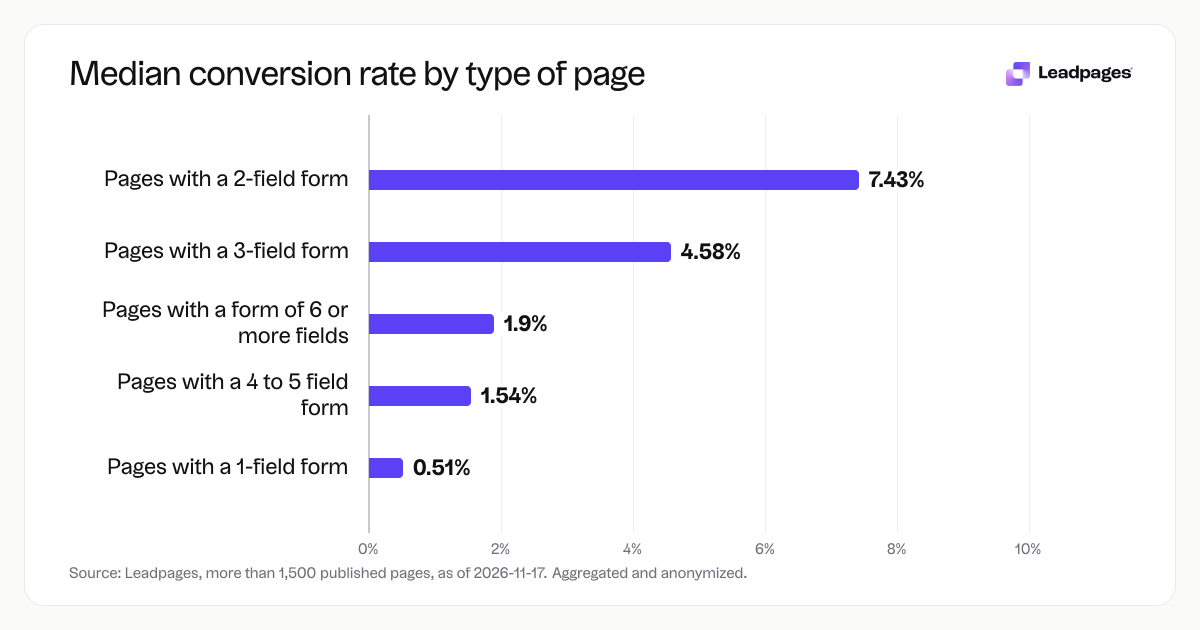
Form conversion rates for pages published with Leadpages, by number of form fields, over the 90 days to 2026-11-16. A form conversion rate is the share of visits to a page in which the visitor submitted its form. Each figure is a median or quartile across pages. It describes the pages in a group, not what causes the difference between groups.
more than 1,500 published pagesAs of November 17, 2026
0.51%
Median form conversion rate, pages with a 1-field form
7.43%
Median form conversion rate, pages with a 2-field form
4.58%
Median form conversion rate, pages with a 3-field form
| Measure | Value |
|---|---|
| Median form conversion rate, pages with a 1-field form | 0.51% |
| Median form conversion rate, pages with a 2-field form | 7.43% |
| Median form conversion rate, pages with a 3-field form | 4.58% |
| Median form conversion rate, pages with a 4 to 5 field form | 1.54% |
| Median form conversion rate, pages with a form of 6 or more fields | 1.9% |
Median form conversion rate, pages with a 1-field form
Median form conversion rate, pages with a 2-field form
Median form conversion rate, pages with a 3-field form
Median form conversion rate, pages with a 4 to 5 field form
Median form conversion rate, pages with a form of 6 or more fields
Based on more than 1,500 published pages. As of November 17, 2026.
What a Google Ads lead form is (and when to use a landing page instead)
Google Ads lead forms (called lead form assets) work inside the ad. When someone taps your headline, the form expands on the spot. They fill in the fields, tap submit, and their info goes to your Google Ads account. It is fast for the user and gives you the lead without a separate page.
This setup fits simple offers: a free guide, a newsletter signup, a quick quote. If you need to sell a service, show a demo, or build trust with testimonials, a standalone landing page with a form often works better. You get room to explain the offer, add images, and collect more detailed data.
How to set up a Google Ads lead form asset, step by step
The steps below walk you through creating a lead form in Google Ads. If you use a landing page instead, skip to the next section.
- Sign in to your Google Ads account and click Campaigns in the left menu. Select Assets, then Assets again if needed. Click the blue plus button and choose Lead form.
- Give the asset a name you will recognize later, like “Spring promotion: eBook”.
- Fill in the form details. Add a headline (up to 30 characters), a business name, and a short description that tells people what they get (max 200 characters). Under Form fields, choose the info you want to collect. The standard options are name, email, phone number, and postal code. You can also add custom questions.
- Add your company’s privacy policy URL. Google requires this before the lead form will run. The URL must point to a page where people can read how you handle their data.
- Upload a background image that fits your brand. Google recommends 1200 x 628 pixels. This image shows above the form on mobile and desktop.
- Write the submission message. This is what someone sees after they tap Submit. Keep it short: “Thanks. We’ll email the guide in the next hour.”
- Choose how you want to receive leads. You can download a CSV from Google Ads, set up a webhook to push leads to your CRM in real time, or use a direct integration with a tool like HubSpot or Salesforce.
- Click Create. Your lead form is ready to attach to a campaign.
- Attach the form. Go to a Search or Video campaign, open the ad group, and add your lead form as an asset. Google will show it when your ad is eligible.
When you prefer a landing page with a lead form
Instead of a lead form asset, you can send clicks to a landing page that hosts a form. This is the right move when the offer needs more explanation, or when you want to collect extra data that the native form fields do not support.
- Build a dedicated landing page. Match the ad’s promise and focus the page on a single action: form submission.
- Keep the form short. Across pages published with Leadpages, the median form conversion rate for a two-field form was 7.43%. That figure drops to 1.54% for forms with four to five fields, and 1.9% for forms with six or more fields. A one-field form sat at 0.51%. If you run ads to a landing page, start with two or three fields.
- Place the form above the fold and make the submit button obvious. Use a clear button label like “Get the guide” instead of “Submit.”
- Publish the page and copy its URL.
- In your Google Ads campaign, set the final URL to that landing page.
Leadpages gives you a drag-and-drop landing page builder and an AI page builder that creates a draft from your description. You can pick from a gallery of templates, customize the form fields, and connect the page to Google Analytics to track conversions. The built-in lead capture forms let you collect and store leads, or forward them to your email tool.
Common lead form problems and how to fix them
Your lead form does not show on the ad
Check that the campaign type supports lead form assets. They work with Search, Display, and Video campaigns. If the asset is attached but not serving, open the ad group and confirm the ad format is eligible. Also make sure your privacy policy link is live and public.
Form fields do not pre-fill
Google may pre-fill fields like name and email if the user is signed in and has shared that data. You do not need to turn anything on. If it stops working, it is often because the user is not signed in or your campaign does not meet the eligibility rules.
You are not seeing new leads
First check the Lead form summary card in Google Ads. If you set up a webhook, test the connection with a tool like Postman or use Google’s test lead feature. For CSV downloads, remember that you need to export leads manually. Go to Assets > Lead form, click the asset, and choose Download leads.
Form does not look right on mobile
The background image can crop differently on smaller screens. Use a high-contrast image with the main subject in the center. Avoid text in the image, because Google overlays the form fields on top. Preview the ad in the Google Ads console on a few phone models.
Conversion rates are low
The number of fields you ask for is one of the fastest things to adjust. Our data shows a clear pattern. Forms with two fields convert far more often than longer forms. Try a stronger incentive in the description, or test a different headline that speaks to the exact pain point your audience searches for. If you use a landing page, run an A/B test. The Leadpages platform has built-in A/B testing to compare two versions and measure which one gets more submissions.
Data appears incomplete or messy
When you add custom questions, make the answer format clear in the question text (for example “Which service: A, B or C?”). If you push leads through a webhook, verify the field mapping matches the expected keys in your CRM.
After you publish: what to do next
Once your lead form is live, measure performance and keep improving it.
Set up conversion tracking. In Google Ads, create a conversion action for lead form submissions so you can see cost per lead and return on ad spend. If you use a landing page, add the Google Ads conversion tag to the thank-you page.
Check the data weekly. Download a CSV of leads or review your CRM feed. Look for patterns. Are certain campaigns sending low-quality leads? Pause them or adjust targeting.
Test different form layouts. Use the free landing page analyzer to score your page and get suggestions on copy, layout, and form placement. Try the free headline analyzer to improve the message above your form.
A/B test your form. Whether the form lives in Google Ads or on a landing page, change one element at a time: field count, button text, or the offer description. Use our A/B test calculator to know when a result is statistically meaningful.
Start building free. Create a Leadpages account to build a landing page with a lead form, or test how a dedicated page performs against a native lead form asset.
A note on the data
The conversion figures in this guide come from an analysis of more than 1,500 landing pages published on Leadpages. Each form conversion rate measures the share of visits in which a visitor submitted the page’s form. The numbers are medians across pages, calculated over the 90 days to 2026-11-16. The sample is aggregated and anonymized; as of 2026-11-17.