
How-to guides
Lead Generation for Attorneys: Turn Visitors Into Clients
Learn attorney lead generation step by step. See how landing pages, forms, and smart follow‑up turn visitors into clients—with conversion data from 13,000+ pages.
Attorney lead generation that works online starts with a dedicated landing page, a clear offer, and a simple way for prospects to reach you. Capture names, email addresses, and phone numbers—then qualify and follow up. This guide walks through the steps, backed by what we see working across thousands of local service professionals.
Leadpages data
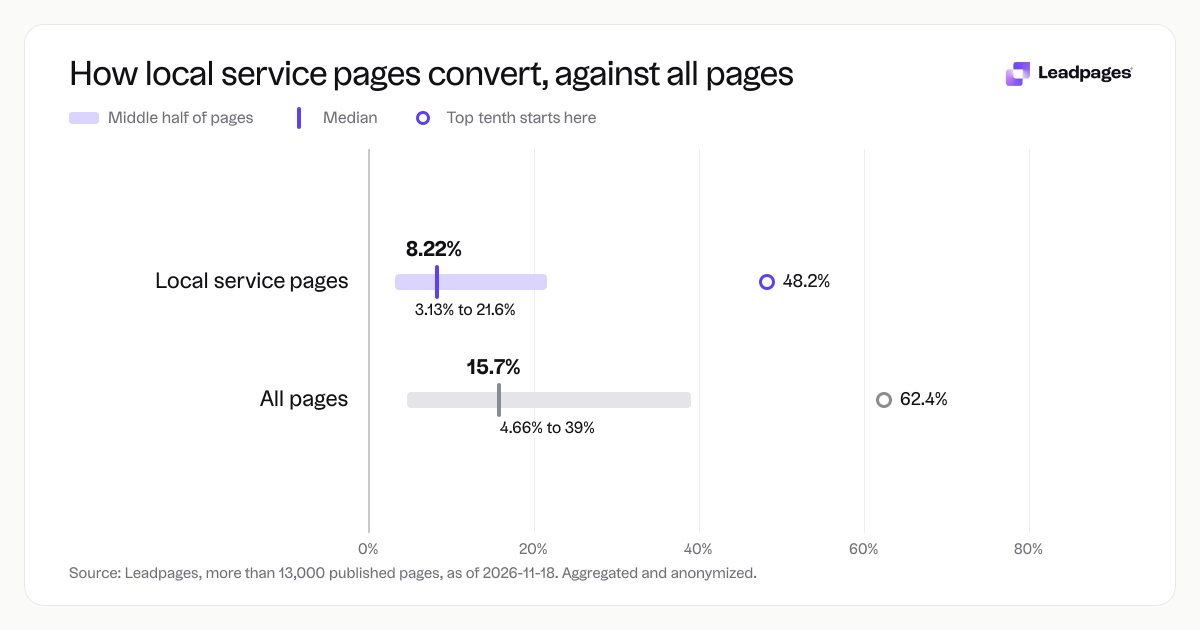
Conversion rates for local service published with Leadpages, compared with all pages
more than 13,000 published pagesAs of November 18, 2026
8.22%
Median conversion rate, local service pages
3.13%
Bottom quarter converts below, local service pages
21.6%
Top quarter converts above, local service pages
| Measure | Value |
|---|---|
| Median conversion rate, local service pages | 8.22% |
| Bottom quarter converts below, local service pages | 3.13% |
| Top quarter converts above, local service pages | 21.6% |
| Top tenth converts above, local service pages | 48.2% |
| Share converting at 10% or better, local service pages | 44.4% |
| Median conversion rate, all pages | 15.7% |
| Bottom quarter converts below, all pages | 4.66% |
| Top quarter converts above, all pages | 39% |
| Top tenth converts above, all pages | 62.4% |
| Share converting at 10% or better, all pages | 59.9% |
Median conversion rate, local service pages
Bottom quarter converts below, local service pages
Top quarter converts above, local service pages
Top tenth converts above, local service pages
Share converting at 10% or better, local service pages
Median conversion rate, all pages
Bottom quarter converts below, all pages
Top quarter converts above, all pages
Top tenth converts above, all pages
Share converting at 10% or better, all pages
Based on more than 13,000 published pages. As of November 18, 2026.
The short answer: How attorneys get leads online
Lead generation for attorneys means getting potential clients to share their contact information so you can start a conversation. The fastest way is to send traffic to a focused landing page that asks for one action—request a free case evaluation, download a guide, or schedule a call. Drive that traffic with paid search, local SEO, or social media, then reply fast with an email sequence or a short phone call.
Across more than 13,000 pages built with Leadpages, local service pages (including attorney pages) show a median conversion rate of 8.22%. That’s a realistic baseline. You don’t need a big budget to get there—you need a simple, repeatable system.
A step-by-step plan for attorney lead generation
1. Pick a lead magnet people will trade their contact info for
Think about what someone who needs a lawyer right now wants. A generic newsletter rarely works. Instead, offer:
- A free case evaluation form
- A downloadable guide: “What to Do After a Car Accident in [State]”
- A quick eligibility quiz for immigration or disability benefits
- Access to a short video explaining a legal process
Match the offer to the practice area and the person’s immediate concern.
2. Build a landing page for one outcome
Where your ad or listing sends people matters. A homepage makes visitors hunt for an action; a standalone landing page removes distractions and points to a single form. With Leadpages, you can use the AI page builder to generate a page in minutes—describe your practice and offer, and it builds a layout you can tweak. Or start from attorney-focused templates in our template gallery.
Put your practice-area headline at the top. Add a short paragraph or bullets of what the visitor gets. Keep navigation minimal. Add a trust signal: a bar membership badge, Google review stars, or a sentence about cases handled.
3. Write a headline and call to action that match the visitor’s intent
If someone clicks an ad that says “Dallas DWI Lawyer Free Consultation,” your landing page headline should say “Get a Free DWI Case Review in Dallas.” Make the call-to-action button specific: “Get My Free Review” beats “Submit.” A free headline analyzer can score your draft, but the real test is whether it matches the promise that brought the visitor to the page.
4. Set up a form that asks only for what you need
Ask for name, phone number or email, and maybe a one-sentence description of the legal issue. If you need more detail to qualify the lead, add one or two fields and plan to A/B test them. Leadpages collects submissions with a lead capture form that connects to your email tool, CRM, or spreadsheet automatically.
5. Send targeted traffic that’s ready to hire
Paid search (Google Ads) often works well for attorney lead generation because people search when they have an immediate need. Focus on specific, local keywords: “car accident lawyer Phoenix,” “estate planning attorney near me.” You can also use paid social to reach people by demographic, or build local SEO with a service-area page that links to your landing page. Set up tracking so you know which source actually brings in clients.
6. Test and improve your page systematically
The top tenth of local service pages convert above 48.2%. Most didn’t start there; they got there with small, measured changes. Run an A/B test on your headline, form length, or button text. A free A/B test significance calculator tells you when you have a winner. Leadpages has built-in A/B testing that splits traffic and shows which variant converts better, so you don’t guess.
Common problems (and how to fix them)
Not enough people visit the page. Expand paid search terms, update your Google Business Profile, or try a Facebook ad targeted at a specific life event (divorce, recent move, accident). Even a small, steady budget can grow leads if the targeting is tight.
People visit but don’t fill out the form. The bottom quarter of local service pages convert below 3.13%. The issue is usually a weak headline, too many fields, or a slow page. Run your page through the landing page analyzer to get a score and specific fixes. Shortening the form from five fields to three can lift conversions noticeably.
You get leads but they aren’t the right fit. Add a qualifying question to the form: “What is your case type?” or “Is the incident date within the last two years?” That one field screens out people who don’t meet your intake criteria before you spend time on them.
You have no time to follow up quickly. An automated email or text can reply within minutes, while the lead is still thinking about their problem. Connect your landing page to your CRM or email platform, and send a short, personal-sounding message that sets up the next step.
What to do next
Once leads start coming in, pick up the phone within a few hours if you can. A quick call qualifies the lead and sets the consultation while interest is high. Track which sources and pages produce the most retained clients—Leadpages analytics shows views, conversion rates, and form submissions by traffic source.
Keep a running list of small improvements to test: a new headline, a different offer, a shorter form. As you move from that 8.22% median toward the top quarter’s 21.6% or beyond, every percentage point means more consultations on your calendar.
How we measured this: The figures in this guide come from an analysis of more than 13,000 published pages built with Leadpages, as of 2026‑11‑18. Data is aggregated and anonymized. We examined conversion rates for all pages and for those in the local services category, which includes law firms, home services businesses, and other local‑market professions.