
How-to guides
How to Build a Sales Page That Converts
Learn how to build a sales page that turns visitors into leads or buyers. Step-by-step process, common fixes, and sales page conversion data from 13,000+ pages.
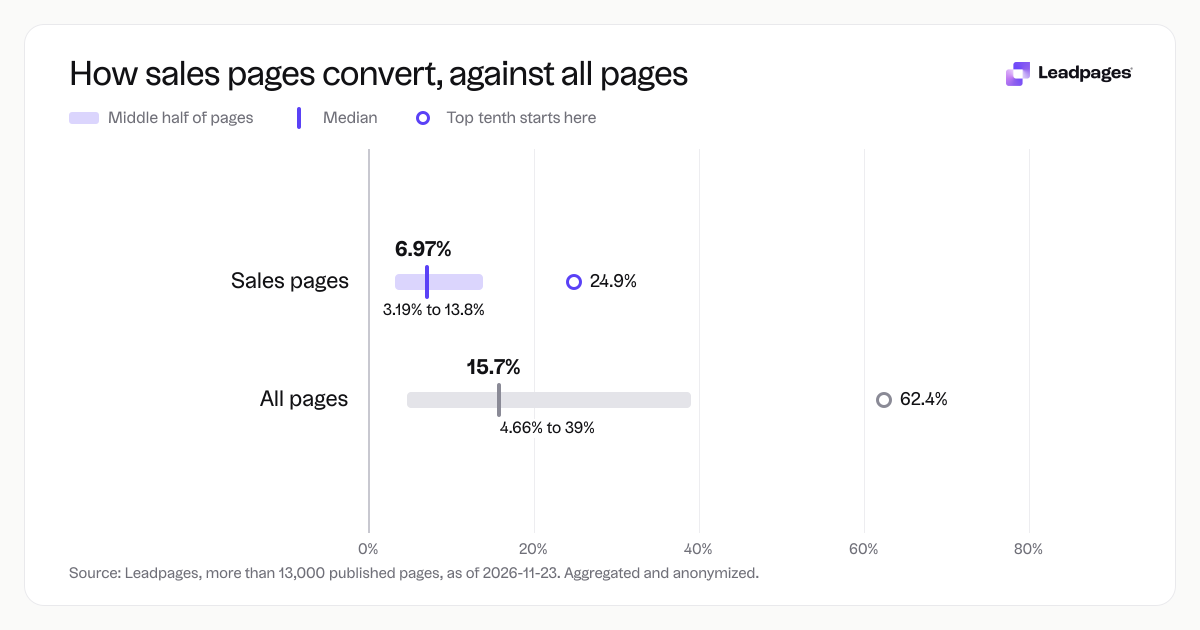
A sales page is a standalone page with one job: get a visitor to take a specific action, such as buy a product, book a call, or join a list. To build one that works, define the action, write a clear offer, frame the message around the visitor's problem, add proof, and use a single call to action. Then test and improve. Across pages published with Leadpages, the median conversion rate for sales pages is 6.97%.
Leadpages data
Conversion rates for sales pages published with Leadpages, compared with all pages
more than 13,000 published pagesAs of November 23, 2026
6.97%
Median conversion rate, sales pages
3.19%
Bottom quarter converts below, sales pages
13.8%
Top quarter converts above, sales pages
| Measure | Value |
|---|---|
| Median conversion rate, sales pages | 6.97% |
| Bottom quarter converts below, sales pages | 3.19% |
| Top quarter converts above, sales pages | 13.8% |
| Top tenth converts above, sales pages | 24.9% |
| Share converting at 10% or better, sales pages | 37.5% |
| Median conversion rate, all pages | 15.7% |
| Bottom quarter converts below, all pages | 4.66% |
| Top quarter converts above, all pages | 39% |
| Top tenth converts above, all pages | 62.4% |
| Share converting at 10% or better, all pages | 59.9% |
Median conversion rate, sales pages
Bottom quarter converts below, sales pages
Top quarter converts above, sales pages
Top tenth converts above, sales pages
Share converting at 10% or better, sales pages
Median conversion rate, all pages
Bottom quarter converts below, all pages
Top quarter converts above, all pages
Top tenth converts above, all pages
Share converting at 10% or better, all pages
Based on more than 13,000 published pages. As of November 23, 2026.
The short answer: one offer, one action
A sales page works when a visitor can answer three questions fast: What is this? Why should I care? What do I do next? If the page answers those clearly and makes the next step easy, it can generate leads or sales even with modest traffic.
Across pages published with Leadpages, the median conversion rate for sales pages is 6.97%. The bottom quarter converts below 3.19%, and the top quarter converts above 13.8%. The top tenth converts above 24.9%. Treat these as benchmarks, not promises. If your page is below 3.19%, the offer or message likely needs work. If your page is above 13.8%, you are in the top quarter and can still improve.
Step by step: build the page
-
Decide the one action. Write exactly what you want the visitor to do. If you ask for a purchase, a follow, and a call on the same page, you split focus. In Leadpages, start by choosing a sales page layout from the landing page template gallery. The layout keeps your page focused on a headline, supporting copy, and one call to action.
-
Write the offer in plain language. Before design, answer: What do they get? What does it cost or require? Why act now? You get the first 7 days free. If you cannot say it in two sentences, tighten the offer. Then use the free call-to-action generator to draft button copy.
-
Choose a layout that follows reader logic. Order sections to match how a buyer thinks: problem or desired result, solution, how it works, proof, price, call to action. Do not hide the price under a long story unless you sell a high-consideration service. In Leadpages, open the landing page builder and drag in sections for headline, benefits, proof, and form. Or use the AI page builder to generate a first draft from your offer.
-
Write the headline and first paragraph. Put the visitor's outcome or problem in the headline. Example for a tax service: "Pay less tax without spending your weekend on spreadsheets." In the first paragraph, say who it is for and what happens after they act. Use the free headline analyzer to check clarity. Run it again after each rewrite.
-
Add proof. People trust a page more when they see evidence. Use short testimonials with a name and a specific result, a screenshot of a real deliverable, a short demo video, or a guarantee. Avoid vague praise like "great product." Specific beats general. Leadpages includes lead capture forms you can pair with a thank-you page or confirmation email. That follow-up supports trust.
-
Put the form and call to action in the first screen. The call to action should echo the offer in a few words: "Get the plan" or "Book my call." Keep the form to the fewest fields you need. Every extra field can reduce completions. Place the form above the fold and repeat the call to action near the bottom for longer pages.
-
Connect analytics and test. Before you send traffic, make sure form submissions are tracked. Then run an A/B test on one element at a time, such as the headline, button text, or form length. Use the free A/B test significance calculator to judge when you have enough data. Leadpages has A/B testing built in. You can duplicate a page, change one element, and split traffic evenly.
Common problems and how to fix them
Most sales pages fail for a few common reasons. Here is what to change.
- The page sells the product, not the outcome. Fix: rewrite the headline and first paragraph around the visitor's desired result. Ask a customer what changed for them, then use that wording.
- The call to action is vague. "Submit" or "Learn more" gives no reason to act. Change it to a specific phrase like "Get the checklist" or "Start my trial."
- There is no proof. Add two or three short testimonials, a case study, or a guarantee. A real estate agent might add a line like "Sold a home in 11 days" with the client's neighbourhood.
- The form asks for too much. Cut every field you do not need for the first follow-up. Name and email are often enough.
- The page is slow on mobile. Test it on a phone. Compress images and remove scripts that do not add value.
- The traffic and the page do not match. If an ad says "Free SEO checklist," the page must say "Free SEO checklist" in the headline and the form. Do not send paid traffic to a general services page.
- The page ends without a next step. After the form, show a confirmation message or send an email that tells the person exactly what happens next. That reduces buyer's remorse and support questions.
If your page converts below 3.19%, fix the offer and the traffic match before you tweak button colors. Run the page through the free landing page analyzer to get a score and a list of issues.
What to do next
Start with the offer you wrote in step 2. Then:
- Score your current page with the free landing page analyzer.
- Rewrite the headline using the headline analyzer.
- Pick a layout from the template gallery and rebuild the page.
- Set up an A/B test with the A/B testing tool.
Take the offer you wrote in step 2, pick a layout, and Start building free.
The conversion figures above come from more than 13,000 published pages. Aggregated and anonymized; as of 2026-11-23.