
How-to guides
How to Do Landing Page SEO with MCP
Use an MCP server to update meta titles, meta descriptions and index settings on your landing pages. Practical steps for Leadpages users.
Landing page SEO with MCP means connecting an AI assistant to your page builder through the Model Context Protocol, then asking it to update the search settings and on-page copy that shape how your page appears in results. Use it to add missing meta titles, write meta descriptions, set canonical addresses and decide if search engines may index each page. This guide shows the general steps, then how to do them in Leadpages.
Leadpages data
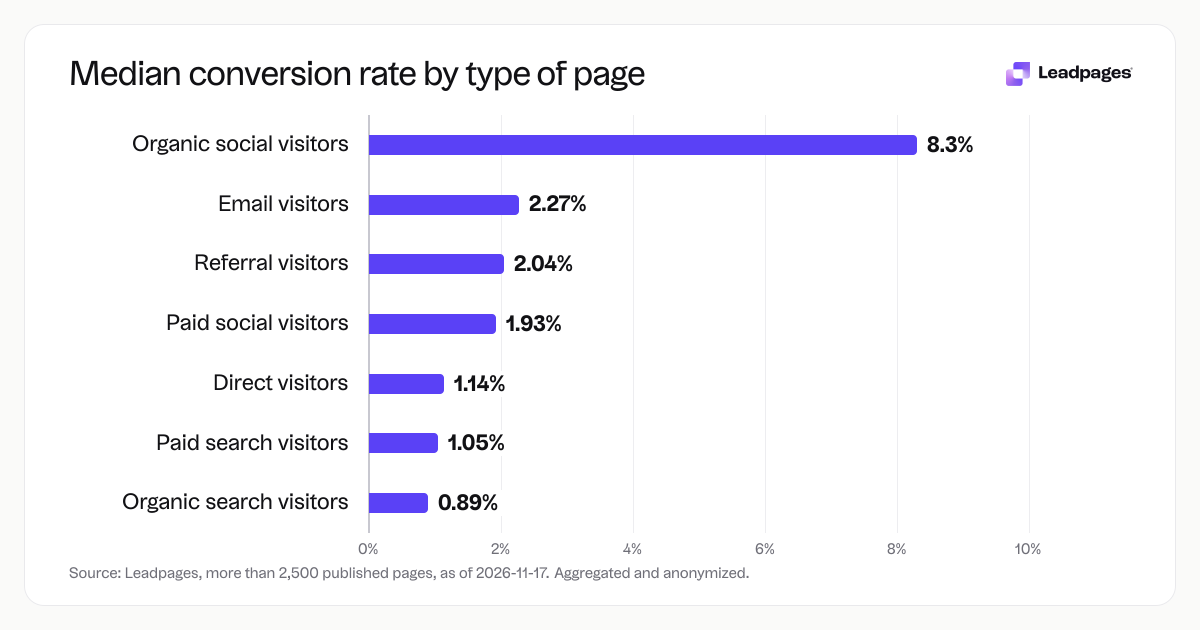
Form conversion rates for pages published with Leadpages, by traffic channel, over the 90 days to 2026-11-16. A form conversion rate is the share of visits to a page in which the visitor submitted its form. Each figure is a median or quartile across pages. It describes the pages in a group, not what causes the difference between groups.
more than 2,500 published pagesAs of November 17, 2026
1.05%
Median form conversion rate, paid search visitors
1.93%
Median form conversion rate, paid social visitors
0.89%
Median form conversion rate, organic search visitors
| Measure | Value |
|---|---|
| Median form conversion rate, paid search visitors | 1.05% |
| Median form conversion rate, paid social visitors | 1.93% |
| Median form conversion rate, organic search visitors | 0.89% |
| Median form conversion rate, organic social visitors | 8.3% |
| Median form conversion rate, email visitors | 2.27% |
| Median form conversion rate, referral visitors | 2.04% |
| Median form conversion rate, direct visitors | 1.14% |
Median form conversion rate, paid search visitors
Median form conversion rate, paid social visitors
Median form conversion rate, organic search visitors
Median form conversion rate, organic social visitors
Median form conversion rate, email visitors
Median form conversion rate, referral visitors
Median form conversion rate, direct visitors
Based on more than 2,500 published pages. As of November 17, 2026.
What landing page SEO with MCP does
MCP is the Model Context Protocol. It lets an AI assistant call tools in another app. An MCP server for SEO connects your assistant to page fields and editing actions.
You type a plain instruction. The assistant calls the server’s tools, makes the change or reads the page, then reports what it did. For landing page SEO, the useful actions are:
- Set the meta title
- Set the meta description
- Set the canonical address
- Set whether search engines may index the page
- Set the Open Graph title, description and image
- Set the Twitter card type
- Read page content and edit headings and copy in place
This is an editing and settings tool, not a rank tracker or a site crawler. If you want to know where you rank for a keyword, use a rank tracker. Use the MCP server to make the edits.
An SEO optimization MCP setup works best as a page editor with a checklist. You choose which pages to update, what they should say, and which fields to change. The assistant handles the repetitive work.
Step by step: update search settings with MCP
These steps work for most MCP setups. Leadpages details are at the end of this section.
-
Choose the assistant you already use. For Leadpages, the MCP server connects to Claude.ai, ChatGPT, Claude Code, Claude Desktop, Cursor and n8n. Add the server in that assistant, then sign in with your Leadpages account. Use the connection guide or the MCP server page to get started.
-
List the pages that need work. Ask the assistant to go through your pages one by one and flag pages with a missing meta description, a duplicate meta title, or no index setting. Use plain language, such as "Check my services pages and list any page without a meta description."
-
Give a specific instruction for each page or group. A weak instruction is "improve my SEO." A useful one names the field, the page and the audience. For example: "On the furnace repair page for Oak Park, write a meta title under 60 characters that includes Furnace Repair Oak Park, and a two-sentence meta description that mentions same-week appointments and free quotes."
-
Review before you publish. Ask the assistant to show the old value and the new value for each change. You stay in control. If a meta description is too generic, tell the assistant to rewrite it using the page's headline and main offer. When you update meta descriptions with MCP, keep page-specific wording in the instruction.
-
Set the index and canonical fields. If a page is a thank-you page or a duplicate, set it to no index. If the same content exists on more than one URL, set the canonical address to the version search engines should treat as the main one. The canonical address tells search engines which URL is the primary version.
-
Do the social share fields. SEO work often stops at the search listing, but shared links use similar fields. Ask the assistant to set the Open Graph title, description and image, and the Twitter card type. Match the page-specific wording used in the meta title and meta description.
-
Repeat after major changes. Run the same pass when you add new pages, change an offer, move a page to a new URL, or update a service area.
In Leadpages, the assistant calls the Leadpages MCP server tools. It can set a page's search settings: meta title, meta description, canonical address and whether search engines may index the page. It can set how a page looks when shared: the Open Graph title, description and image, and the Twitter card type. It can read a page's content and edit headings and copy in place. It can also go through your pages one after another, for example to write a missing meta description for each.
You can copy and adapt ready-made requests from the example prompts for the Leadpages MCP.
Common problems when using MCP for landing page SEO
The assistant updates too much at once
If you ask for "better SEO," it may rewrite headings, body copy and metadata together. Narrow the scope. For example: "Only update the meta description. Leave the headline and body copy as they are."
The assistant does not have access to the right page
The Leadpages MCP server only works on pages in Leadpages. If the page is built in another system, make the SEO edits in that system's editor. If the sign-in is wrong or the connection expired, reconnect the MCP server in your assistant.
The assistant writes generic metadata
Give it specifics. Include the offer, location, audience and the action you want a visitor to take. A description like "We provide quality services" is less useful than "Same-week furnace repair in Oak Park with free quotes and certified technicians."
You expect the MCP server to track rankings
It does not run a rank tracker or a site crawl. It changes the settings and content of your Leadpages pages. If you need rank tracking, use a tool built for that job. Use MCP for the edits.
You change the right fields and still do not see an immediate lift
Search rankings and click-through depend on many factors outside page settings. Some changes take time to appear in results. Keep measuring against your own baseline.
Traffic source also affects what a page produces. Across pages published with Leadpages, the median form conversion rate for organic search visitors is 0.89%, and for paid search visitors it is 1.05%. For organic social visitors the median is 8.3%. These figures describe the pages in a group, not what causes the difference between groups.
| Traffic source | Median form conversion rate |
|---|---|
| Organic search visitors | 0.89% |
| Paid search visitors | 1.05% |
| Paid social visitors | 1.93% |
| Organic social visitors | 8.3% |
| Email visitors | 2.27% |
| Referral visitors | 2.04% |
| Direct visitors | 1.14% |
If your page gets most of its traffic from one source, compare it with that row, not with the highest number in the table.
What to do next
Start with one page that already gets search visits. Run a quick check with the free landing page analyzer to see what the page is doing today. Put the headline through the headline analyzer before you ask MCP to rewrite anything. If you plan to test two versions of a page, use the A/B test calculator to check whether a result is meaningful.
Then connect the Leadpages MCP server and run the first pass. Use the example prompts to give the assistant a clear starting point. After the changes go live, wait for search engines to recrawl the pages, then review the results in Leadpages analytics.
Start building free with Leadpages.
Data note: the figures above come from Leadpages pages over the 90 days to 2026-11-16. The sample is more than 2,500 published pages. Aggregated and anonymized; as of 2026-11-17.