
How-to guides
How to Create Landing Pages on WordPress
Learn how to create landing pages on WordPress that convert. Step-by-step process, common issues and fixes, plus what to do after you publish.
Leadpages data
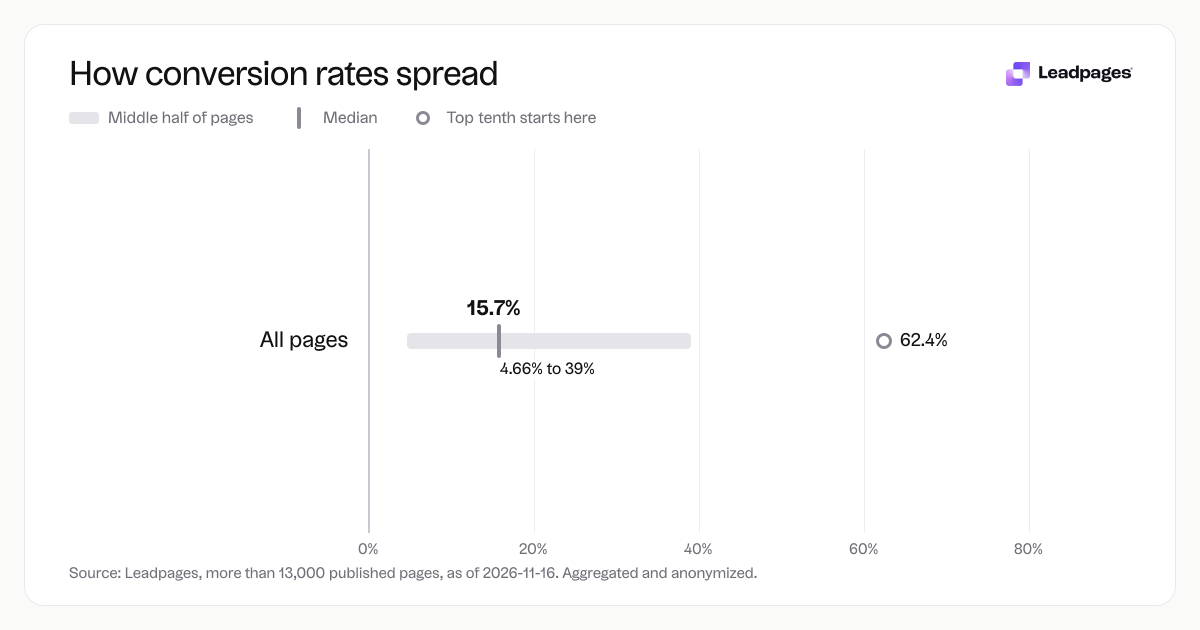
Conversion rates for pages published with Leadpages, by industry and page type
more than 13,000 published pagesAs of November 16, 2026
15.7%
Median conversion rate, all pages
4.66%
Bottom quarter converts below, all pages
39%
Top quarter converts above, all pages
| Measure | Value |
|---|---|
| Median conversion rate, all pages | 15.7% |
| Bottom quarter converts below, all pages | 4.66% |
| Top quarter converts above, all pages | 39% |
| Top tenth converts above, all pages | 62.4% |
| Share converting at 10% or better, all pages | 59.9% |
Median conversion rate, all pages
Bottom quarter converts below, all pages
Top quarter converts above, all pages
Top tenth converts above, all pages
Share converting at 10% or better, all pages
Based on more than 13,000 published pages. As of November 16, 2026.
You can add a landing page to your WordPress site with a builder that works inside your theme or by publishing a standalone page through a tool that connects to your domain. Aim for a page that loads fast and drives one action—without sidebars, menus, or blog feeds that split attention.
The Fastest Way to Get a Landing Page on WordPress
The most direct method is a landing page platform that integrates with WordPress. For example, Leadpages lets you build a page in a drag-and-drop editor and publish it as a normal WordPress page through a free plugin. This gives you a blank canvas that doesn’t inherit your theme’s header, footer, or sidebar clutter. You can also publish on a subdomain and link it from your main navigation. Either way, you skip theme wrangling and get a fast, focused page.
How to Build Your WordPress Landing Page, Step by Step
Follow these steps to plan, design, and publish a landing page that turns visitors into leads or customers.
1. Define your conversion goal and call to action
Choose the single action you want: sign up for a demo, register for a webinar, download a guide. Write a call-to-action that matches the promise of the ad or link that brought visitors to the page. Make every element—headline, image, copy, button—support that action.
2. Pick the right tool for the job
You can build a landing page in WordPress with the block editor or a page builder plugin, but those often load extra theme scripts and make removing navigation hard. A dedicated landing page builder handles this for you. Leadpages integrates with WordPress so you can design outside your theme and publish as a standard WordPress page with one click. See how it works.
3. Choose a template built for your goal
Start from a conversion-focused template, not a blank page. Leadpages offers templates for lead capture, webinar registration, ebook downloads, and more. Browse templates. A purpose-built template gives you a head start on layout and best practices.
4. Write and test your headline
Your headline should instantly tell visitors what they get. Use a free headline analyzer to score clarity and emotional pull. Analyze your headline. A strong headline can lift conversions on its own.
5. Build your form and connect your email tool
Add a lead capture form or a CTA button. Keep fields to a minimum—name and email are often enough. Connect the form to your email marketing tool or CRM so registrations flow automatically. Leadpages forms integrate with most major email providers. See form features.
6. Add trust-building elements
Use a short benefit list, social proof (like number of downloads or signups), and a brief privacy note near the form. Keep paragraphs short so visitors can scan the page fast.
7. Publish to your WordPress site
If you’re using Leadpages, install the free WordPress connector plugin. Build your page in the editor, click Publish, and choose the WordPress option. The page appears on your domain as /your–page–slug. No coding needed.
8. Test on every device
Open the page on your phone, tablet, and desktop. Check that forms are easy to fill out on a small screen and that images load quickly. Run the page through a free landing page analyzer to get a score and spot issues that hurt conversion. Score your page.
Common Problems When Creating Landing Pages on WordPress (and How to Fix Them)
- Theme interference. Some themes add headers, footers, sidebars, or pop-ups that clutter landing pages. Fix: Use a landing page tool that gives you a blank canvas, or publish as a standalone page outside your theme.
- Slow page speed. Too many scripts from plugins and theme elements can drag load time. Fix: Minimize plugins, compress images, and use a builder that serves optimized pages.
- Mobile layout breaks. A page that’s fine on desktop may look messy on a phone. Fix: Use a responsive template and always preview on a real device.
- Form not connecting to email. Integrations can stop syncing. Fix: Test after publishing and set alerts for failed syncs. Dedicated landing page builders often have direct, tested integrations.
- Weak headline. A headline that doesn’t match intent lowers conversions. Fix: Echo the wording of the ad or email link that sent visitors, then test variations.
- Too many form fields. Long forms scare people away. Fix: Stick to name and email for lead generation pages.
If you ignore these issues, your page could land in the bottom quarter of landing pages—those that convert below 4.66%. With a little attention, you can move into the middle or even the top of that range.
What to Do After You Publish Your Landing Page
Once the page is live, focus on traffic and improvement.
- Track conversions. Use analytics to see visits, conversions, and conversion rate. Establish a baseline before you optimize.
- Run A/B tests. Create a version with a different headline, button color, or form length. Let both run and see which converts better. A/B testing helps you climb from the median conversion rate toward the top quarter. Across pages published with Leadpages, the median conversion rate is 15.7%. The top quarter of pages convert above 39%, and the top tenth convert above 62.4%. Steady testing is how top-performing pages reach those numbers. Set up A/B tests.
- Refine your call to action. Small wording changes can make a noticeable difference. Use a free CTA generator to explore stronger language. Try the CTA generator.
- Follow up with leads. A page that collects emails starts a relationship. Set up an automated welcome email and a simple lead nurture sequence. Lead generation guide.
- Drive targeted traffic. Use paid search ads, paid social posts, or organic sharing to reach the right people. For each traffic source, consider a dedicated landing page so the message stays consistent.
A note on the conversion data we mentioned: Across pages published with Leadpages, the median conversion rate is 15.7%. The bottom quarter convert below 4.66%, the top quarter above 39%, and the top tenth above 62.4%. Overall, 59.9% of these pages convert at a rate high enough to be a reliable source of leads. These figures come from an aggregated, anonymized analysis of more than 13,000 published pages as of 2026-11-16.
Ready to build your first landing page? Start building free.