
How-to guides
Lead Generation: A Practical Step‑by‑Step Guide
Learn how to do lead generation step by step. Get a clear process, fix common problems, and turn visitors into leads. Start with a free trial of Leadpages.
Leadpages data
Conversion rates for pages published with Leadpages, by industry and page type
more than 13,000 published pagesAs of November 16, 2026
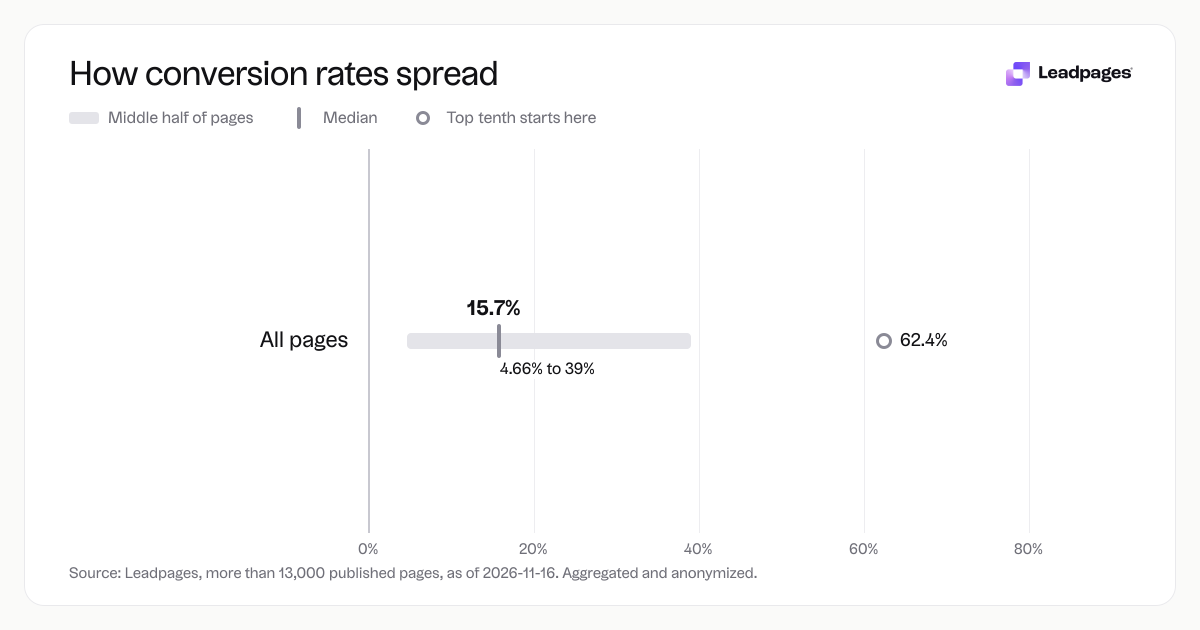
15.7%
Median conversion rate, all pages
4.66%
Bottom quarter converts below, all pages
39%
Top quarter converts above, all pages
| Measure | Value |
|---|---|
| Median conversion rate, all pages | 15.7% |
| Bottom quarter converts below, all pages | 4.66% |
| Top quarter converts above, all pages | 39% |
| Top tenth converts above, all pages | 62.4% |
| Share converting at 10% or better, all pages | 59.9% |
Median conversion rate, all pages
Bottom quarter converts below, all pages
Top quarter converts above, all pages
Top tenth converts above, all pages
Share converting at 10% or better, all pages
Based on more than 13,000 published pages. As of November 16, 2026.
Lead generation turns a stranger into someone who raises their hand and says they’re interested. It’s the system that collects contact information — an email address, a phone number — from people who might buy later. If you want a steady flow of potential customers without chasing each one, you need a process that works.
Here’s how to do lead generation, step by step, and how to keep improving it. You’ll see what the numbers look like for real pages, where the trouble spots are, and what to do once your engine is running.
What lead generation is and why it matters
Lead generation is capturing visitor information so you can follow up. It’s not one tactic. It sits at the intersection of traffic, an offer, a landing page, and a form. When you get it right, a visitor reads something useful — a guide, a demo, a discount — and trades their email for it.
This is the foundation of a predictable sales pipeline. Without it, you’re hoping people call you. With it, you build a list you can educate, nurture, and sell to over time. Lead generation and list building go together: every lead becomes a contact you own, not just a follower that an algorithm can take away.
Across pages published with Leadpages, the median conversion rate is 15.7%. That means half of the pages turn at least 15.7% of visitors into leads. The data comes from an analysis of more than 13,000 published pages, aggregated and anonymized as of 2026-11-16. Those numbers show that a well‑built lead generation page is not a gamble — it’s a repeatable asset.
Step‑by‑step: How to build a lead generation system
You can set up a working lead generation flow in a few hours. Follow these steps in order, and you’ll have something that captures leads while you sleep.
1. Decide what you’ll offer
Nobody hands over an email address for nothing. Your offer — often called a lead magnet — should solve a specific, urgent problem for your ideal customer. Make it immediately useful and easy to consume. Strong options include a checklist, a short email course, a template, a calculator, or a live demo registration.
Match the offer to the traffic source. If someone lands on your page after searching “how to reduce cart abandonment,” give them a quick‑win guide on that exact topic, not a generic newsletter. That alignment moves a visitor from curious to willing.
2. Build a dedicated landing page
Your offer lives on a landing page with one job: get the visitor to fill out the form. Remove navigation menus, sidebars, and anything that steals attention. You need a clear headline, a few bullets about the offer’s value, and a form. That’s it.
Use the Leadpages landing page builder or the AI page builder to create a page quickly, even without a designer. Pick a template from the gallery that’s structured for opt‑ins, then swap in your copy and offer image. Keep friction low.
3. Write a headline that tells the visitor what they’ll get
Promise one clear outcome. “Get the 5‑point checkout audit that catches lost sales” beats “Download our e‑book.” Test a few versions. A free headline analyzer can score clarity, emotion, and length.
4. Add a form that collects only what you actually need
Every extra field reduces completion. If all you need to start a nurture sequence is an email address, ask only for an email address. If you need a name to personalize emails, add that, then stop. Lead capture forms in Leadpages let you drag and drop fields and adjust them anytime.
5. Drive traffic to the page
A landing page does nothing if nobody sees it. Send traffic with paid search ads, social posts, guest blog links, or a link in your email signature. Match the message in the ad or post to the headline on the page so visitors feel they’re in the right place. For paid search and social, use dedicated options like landing pages for paid search or paid social to keep the experience consistent.
6. Measure and improve
Watch the conversion rate: how many visitors became leads. That’s your baseline. Small gains compound. Tweak the headline, form length, button copy, or the offer itself, and compare. Use an A/B test significance calculator to know when a change is statistically reliable, and run tests in the A/B testing feature in Leadpages.
Lead generation problems and how to fix them
Even a good page can underperform. These are the most common lead generation problems, and how to solve each one.
Your conversion rate is below 4.66%
Our data shows the bottom quarter of pages published with Leadpages convert below 4.66%. If you’re in that range, it’s often a mismatch between what the visitor expected and what they see. Check the traffic source and the landing page side by side. Does the page deliver exactly what the ad or link promised? If not, rewrite the headline and offer summary until they mirror each other.
Another common cause is a form that asks for too much. If you’re asking for a phone number and company size for a simple checklist download, strip the form back to email only. Ask for more details later.
You’re getting traffic but few conversions
If visitors arrive and leave without action, test your page with the free landing page analyzer. It scores clarity, social proof, and call‑to‑action strength, with a prioritized list of fixes. Often, the call‑to‑action button is too vague — “Submit” versus “Send me the guide” — or the page lacks proof that the offer delivers.
Add a short testimonial, a customer count (“Join 1,500 others…”), or a specific result someone got from the offer. That small piece of evidence can lift conversion rates.
Your conversion rate is good, but you can still get more
The top quarter of pages in our data convert above 39%, and the top tenth convert above 62.4%. Reaching those brackets often comes down to steady testing. Test one element at a time, run it to a meaningful sample, and keep the winner. Over months, a series of small gains can double your leads.
Also check whether the offer is still fresh. A guide from two years ago may have lost its edge. Update it or swap it for something more timely, like a registration page for a webinar.
You generate leads but nobody buys
This is a follow‑up problem, not a landing page problem. A lead who downloads a guide is rarely ready to buy right away. Set up an email sequence — three to five messages — that educates and builds trust. Mention your product only after you’ve delivered standalone value. Over time, a portion of those leads will raise their hand again, and that’s when you convert them.
You don’t know if your numbers are normal
59.9% of pages published with Leadpages are in the high‑performing bracket. That’s a useful data point: if your conversion rate is in that range, you’re doing well. The range is wide because industries, offers, and traffic quality vary. Don’t chase a magic number; focus on moving your own baseline upward month over month.
Next steps for your lead generation strategy
Once your first landing page and offer are running, scale up. Create a new offer for a different segment. Build a series of lead magnets that address different stages of the buying journey, from early awareness to near‑purchase. Link them so a lead who downloads one offer naturally wants the next.
If you run paid ads, give each campaign its own landing page. This keeps the message tight and lets you test offers independently. Tools like Leadpages for lead generation give you unlimited pages and traffic, so you can run dozens of pages without hitting a platform cap.
When you’re ready to refine further, lean on testing. A small change — a different headline, a shorter form, a more specific call‑to‑action — can shift your conversion rate from average to top‑tier. Use the call‑to‑action generator to find a strong CTA in seconds.
The best way to improve is to start. Build one page, send a little traffic, and see what happens. You’ll learn more from real data than from any theory.
Note on the data: These figures come from an analysis of more than 13,000 published Leadpages pages, aggregated and anonymized as of 2026‑11‑16.