
How-to guides
Local Lead Generation: What Works for Local Services Right Now
A plain-English guide to local lead generation for small services. Steps to build a converting page, common problems, and conversion rates from local service pages.
Local lead generation means getting people near you who need your service to contact you. For a plumber, that turns a search for "emergency plumber near me" into a phone call. For a house cleaner, it becomes a booked estimate. The workhorse is a landing page built around one offer, like a free inspection or a seasonal discount.
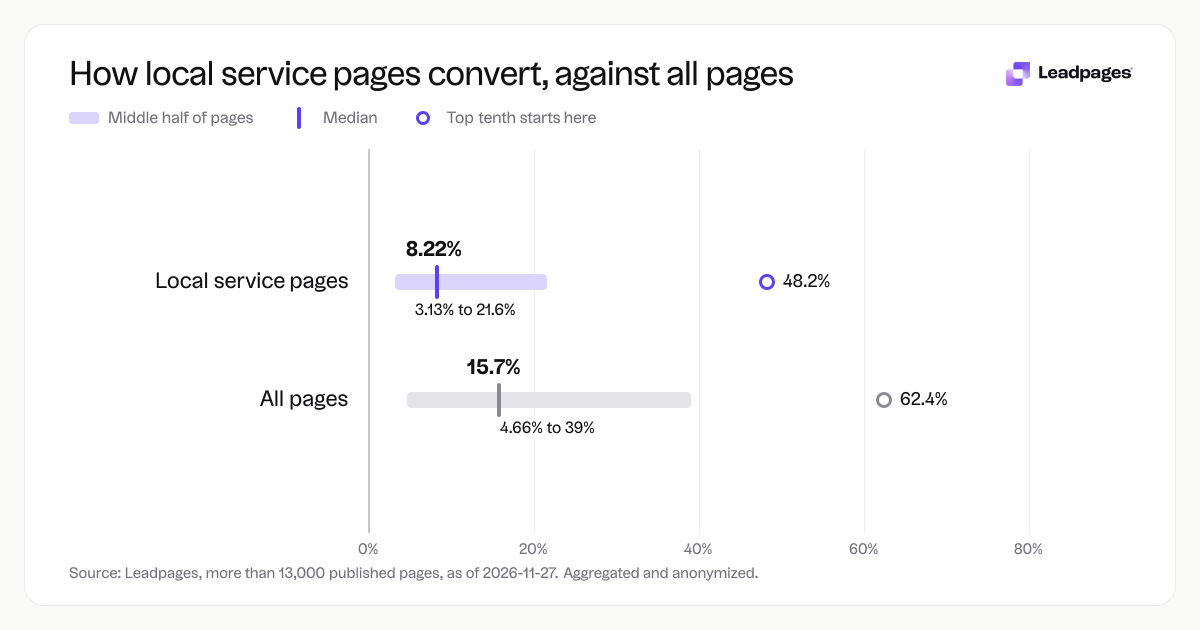
Across pages published with Leadpages, local service pages have a median conversion rate of 8.22%. The top quarter convert at 21.6% or above, and the top tenth convert at 48.2% or above. Some pages struggle (the bottom quarter fall below 3.13%), and a few focused changes can often fix that. Here's how to plan, build, and improve a local lead generation system.
Leadpages data
Conversion rates for local service published with Leadpages, compared with all pages
more than 13,000 published pagesAs of November 27, 2026
8.22%
Median conversion rate, local service pages
3.13%
Bottom quarter converts below, local service pages
21.6%
Top quarter converts above, local service pages
| Measure | Value |
|---|---|
| Median conversion rate, local service pages | 8.22% |
| Bottom quarter converts below, local service pages | 3.13% |
| Top quarter converts above, local service pages | 21.6% |
| Top tenth converts above, local service pages | 48.2% |
| Share converting at 10% or better, local service pages | 44.4% |
| Median conversion rate, all pages | 15.7% |
| Bottom quarter converts below, all pages | 4.66% |
| Top quarter converts above, all pages | 39% |
| Top tenth converts above, all pages | 62.4% |
| Share converting at 10% or better, all pages | 59.9% |
Median conversion rate, local service pages
Bottom quarter converts below, local service pages
Top quarter converts above, local service pages
Top tenth converts above, local service pages
Share converting at 10% or better, local service pages
Median conversion rate, all pages
Bottom quarter converts below, all pages
Top quarter converts above, all pages
Top tenth converts above, all pages
Share converting at 10% or better, all pages
Based on more than 13,000 published pages. As of November 27, 2026.
A step-by-step local lead generation plan
1. Pick one service and one offer
Start with the problem you solve right now. Instead of a page that lists every service, build one for a specific need: drain cleaning in winter, post-construction maid service, or lawn aeration in early spring. Then attach a clear offer: "schedule a free inspection," "get a quote in 2 hours," or "first service at a discount." A specific offer makes the decision easy.
2. Build a landing page with that single offer
Your page needs five things:
- A headline that repeats the offer someone clicked on (for example, from your ad or profile link).
- A short paragraph that explains what they get and why they should trust you.
- A form or a large tap-to-call phone number.
- A trust signal: a photo of your van, a review snippet, a local address.
- No navigation menu, no links to your blog, no distractions.
You can build this in Leadpages by starting with a template from the landing page template gallery. Choose a lead generation layout, swap in your text and images, and publish. Or use the AI page builder to describe your business in plain language and get a page in about a minute. The form connects through lead capture and sends every lead straight to your email or CRM.
3. Write a headline that a local customer understands in one glance
Test your headline cold. If someone reads the page without seeing the ad first, do they know what you do and where? A line like "Need an electrician in Richmond today? Get a free estimate now" beats "Expert Electrical Services" because it is specific. Run it through the free headline analyzer to check clarity and strength.
4. Ask for only the information you truly need
Each extra field is one more reason to stop. For a local lead, a name, phone number, and a one-line description of the job are enough. You can always get more detail later. If you need an email address, add it, but check that you actually use it. Many local services close over the phone, so the number is the priority.
5. Send local traffic to the page
Use free or low-cost local channels:
- Add the landing page link to your Google Business Profile, Apple Maps listing, and any directory you appear in.
- Post in local Facebook groups, Nextdoor (where rules allow), and neighborhood email lists.
- Run a small paid search campaign targeting people searching for your service in your zip codes or city. Link the ad straight to the page.
- If you send emails, include the offer and link in your signature.
For each audience, consider a separate version of the page so the message lines up. A person from a Facebook post about "summer AC tune-up" should land on a page about exactly that, not a generic HVAC page.
6. Respond to leads as fast as you can
Call or text within a few minutes if you can, while the person is still thinking about the job. Set up an immediate SMS or email thank-you so the lead knows you received their request, then call them yourself. If you use a CRM, connect the form directly so leads appear there right away.
7. Test variations to raise your conversion rate
Small changes can lift a page out of the bottom quarter (below 3.13%). Try a different headline, a shorter form, or a clearer offer. Use A/B testing in Leadpages (Grow plan and up) to split visitors evenly between two versions. Wait until one version is the clear winner according to the A/B test significance calculator, then make that the main page. Keep testing as you get more traffic.
Common problems that stop local lead generation (and practical fixes)
You built a page but almost nobody visits it
Make sure your Google Business Profile links to the landing page, not your homepage. Run a small local ad to test demand. Publish one helpful post on your website or LinkedIn titled "How to choose a pet sitter in Denver" and link the phrase "get a quote" to your landing page.
People visit but don't fill in the form
Check the first thing a visitor reads: the headline and subheadline. If your Facebook post offered a "Free gutter cleaning quote in Austin" but the page headline says "Full-service gutter solutions," the mismatch loses people. Use the same words on the page as in the post.
Also, check how the page looks on a phone. Most local searches happen on mobile. Buttons must be large, forms short, and the phone number tappable. Use the landing page analyzer to get a mobile score and spot issues.
If your offer feels too big, test a smaller one. Instead of "Book a full roof replacement," offer "Get a no-obligation roof inspection."
Leads come in but don't turn into customers
Slow follow-up is the most common culprit. Set a rule to call within 2 minutes during business hours. Add a "preferred time to call" field to your form so you reach them when it is convenient.
Also, check the quality of intent. If people are comparison shopping, give them a reason to choose you on the call, like a time-limited discount or a short, useful checklist you email after the call.
You don't know if the page is working
You need to see how many visitors land and how many become leads. Leadpages includes analytics that show visits, conversions, and conversion rate over time. Without that number, you can't tell if changes help or hurt.
You're stuck below 3.13% (the bottom quarter)
Do not assume your market is too competitive. Often the fix is clarity: a headline that matches the traffic source, a single button, and a photo of a real person on your team. Make those changes and measure again.
What to do next after you start generating leads
Once a page converts consistently, duplicate it for other services and locations. A roofer might have one page for roof inspections, one for emergency tarping, and one for gutter cleaning, each targeted to a different search or social post. Use the templates you saved to keep the design consistent while swapping in local details.
Add a thank-you page that confirms the inquiry and sets expectations: "We'll call you within 15 minutes." A thank-you page can also offer a next step, like "read our 5-star reviews" or "follow us on Facebook."
On the Leadpages Optimize plan and up, Smart Traffic sends each visitor to the version of the page they're most likely to convert on, so you don't have to pick a winner by hand.
Track what works. Make a simple spreadsheet listing each page, its traffic source, the number of leads, and the number of booked jobs. After a few months, you'll know your cost per lead and which sources bring booked jobs.
Start building today. Open a free trial to create your first local landing page, test it with some traffic, and see what kind of conversion rate you get in the first two weeks. Use the numbers from your own page, not industry averages, to decide what to fix next.
How we measured this These figures come from more than 13,000 Leadpages Classic pages that recorded conversions, measured as conversions per unique visitor over each page's lifetime. We report figures for local service pages and for all pages in that sample. Your own page's rate depends on its offer, traffic, and market.