
How-to guides
How to Create a Mobile App Landing Page That Converts
Build a mobile app landing page that converts. Step-by-step guide with real conversion data, mobile-first tips, and free tools.
A mobile app landing page (often called a mobile application landing page or mobile apps landing page) is a standalone page built to get visitors to download your app, sign up for early access, or take one clear action. Design for mobile first, lead with a concrete benefit, and keep the form short. This guide shows you how to build a page that turns mobile traffic into leads, using our data from thousands of real pages to highlight what matters.
Leadpages data
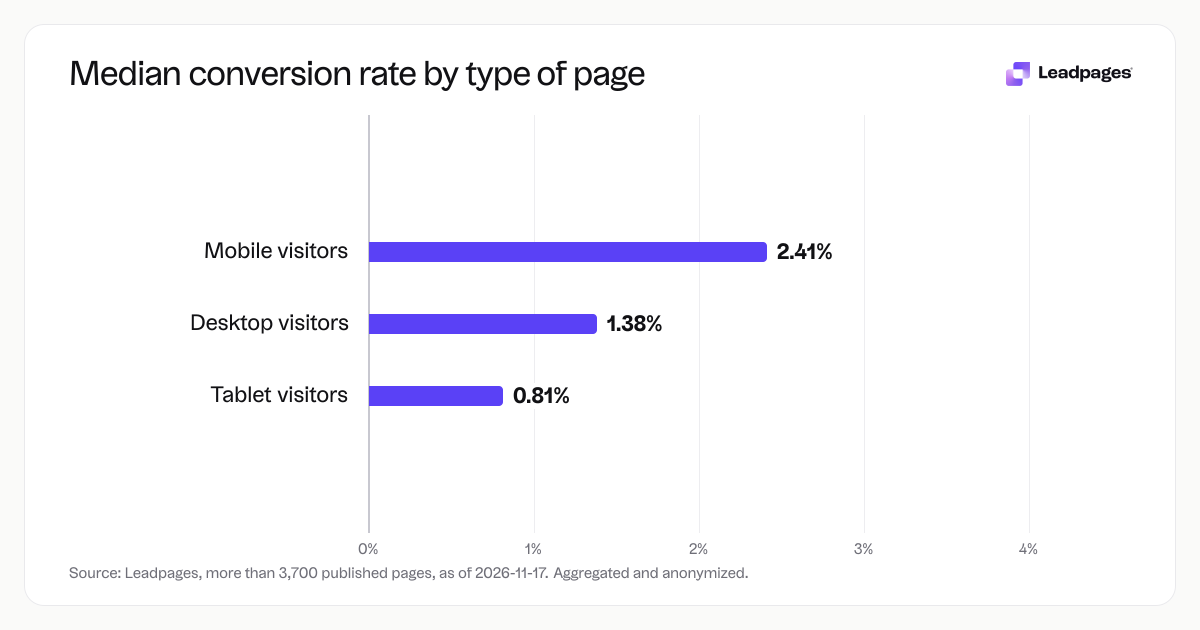
Form conversion rates for pages published with Leadpages, by device, over the 90 days to 2026-11-16. A form conversion rate is the share of visits to a page in which the visitor submitted its form. Each figure is a median or quartile across pages. It describes the pages in a group, not what causes the difference between groups.
more than 3,700 published pagesAs of November 17, 2026
| Measure | Value |
|---|---|
| Median form conversion rate, mobile visitors | 2.41% |
| Median form conversion rate, desktop visitors | 1.38% |
| Median form conversion rate, tablet visitors | 0.81% |
Median form conversion rate, mobile visitors
Median form conversion rate, desktop visitors
Median form conversion rate, tablet visitors
Based on more than 3,700 published pages. As of November 17, 2026.
What a mobile app landing page needs to do
A high-converting mobile app landing page does six things at once. It loads fast on a phone, states a specific benefit in the headline, uses one prominent call-to-action button, asks only for essential information, reassures visitors with trust signals, and makes the next step obvious. Nail those basics and the rest is detail.
Across pages published with Leadpages, the median form conversion rate for mobile visitors is 2.41%, compared to 1.38% for desktop and 0.81% for tablet. Mobile visitors who land on a well-built page are often the most ready to convert. That makes a mobile-first approach not a nice-to-have, but the smart way to start.
Step by step: Build your mobile app landing page
Follow these eight steps in order. Each one boosts performance on a small screen.
1. Start with a mobile-first template
Don’t shrink a desktop design and hope it works. Pick a template built for mobile responsiveness. Leadpages offers mobile-optimized landing page templates that adapt to any screen width without coding. If you want to move even faster, the AI page builder can generate a mobile-first design from a short description of your app.
Starting mobile-first saves time and reduces rework. Our benchmarks show that pages built with mobile in mind hold attention longer on smaller screens, where every tap and scroll matters.
2. Write a headline that states the benefit
Your headline has about three seconds to earn a tap. Say what the app does for the visitor, not what it is. “Track your runs with zero phone setup” beats “RunTracker 4.0 mobile app.” Test options with the free headline analyzer to see which wording has the strongest pull.
Keep the headline under 10 words so it doesn’t wrap on a narrow phone viewport. Use a subheading for extra context, but make sure the headline stands alone.
3. Place one clear call to action
A mobile screen can carry only one primary action without confusion. Make that action a single button—usually “Download,” “Get Early Access,” or “Sign Up Free.” Match the button text to the exact step the visitor takes next.
Avoid competing links, social sharing buttons, or secondary navigation near the primary CTA. If you need a secondary action for desktop, hide it on mobile with responsive visibility.
4. Use a short lead capture form
On a mobile app landing page, every extra field costs submissions. Start with just an email address. Later, you can test adding a name field if you need it for personalization—but only after you have a baseline conversion rate.
Our form data across thousands of pages shows that shorter forms produce higher submission rates. Start lean and add fields only when the business value is clear.
###5. Add trust elements without crowding the screen Social proof works on mobile, but keep it compact. Use one row of recognizable brand logos (if you have them), a short star rating with a review count, or a one-line user quote. Avoid a full review carousel that requires swiping; it often goes unnoticed or annoys people.
Place trust signals close to the CTA button so visitors see them just before they tap.
###6. Optimize load speed for cellular connections A page that takes longer than three seconds to load on 4G loses visitors fast. Compress images to WebP, minify CSS and JavaScript, and skip heavy video autoplay. Run your page through the free landing page analyzer for a speed score and a list of specific improvements.
If you embed an app preview video, host it on a fast CDN and load it only after a user taps play. Background videos on mobile hurt both speed and conversion.
###7. Test the page on real phones Desktop simulators aren’t enough. Open the page on an iPhone, an Android device, and a mid-range tablet. Check tap targets: every button and link should be at least 44x44 pixels, with no two tappable elements closer than 8 pixels. Verify that forms don’t zoom unpredictably and that text stays readable without pinch-zooming.
###8. Set up A/B testing immediately Don’t assume your first version is best. Run an A/B test on your headline or a shorter form. Leadpages includes built-in A/B testing that shows statistically significant results once there’s enough traffic. Aim for at least 100 conversions per variant before you call a winner.
Common problems with mobile app landing pages (and how to fix them)
Problem: The page loads slowly on mobile
Fix: Compress images before uploading, use system fonts, and remove unused third-party scripts. The landing page analyzer pinpoints which files slow things down and how many kilobytes you’ll save by fixing them.
Problem: The form asks for too much
Fix: Cut the form to one or two fields. If you need a phone number, test whether it’s worth the drop in conversions with an A/B test. Form collection in Leadpages makes it easy to edit fields and see conversion rates per variation.
Problem: The button is hard to tap
Fix: Set your primary CTA button to at least 48 pixels tall and full width on screens under 375 pixels. Add white space so thumbs don’t hit other links. Preview on a real phone, hold it in one hand, and try to tap the button without shifting your grip.
Problem: The headline doesn’t convey the app’s value
Fix: Write three alternatives that describe the user’s outcome, not a feature. Use the headline analyzer to score each one, then A/B test the two best. Small wording changes often move conversion rates by double digits.
Problem: You’re not tracking conversions correctly
Fix: Connect your page to Google Analytics or the built-in Leadpages analytics before you drive paid traffic. Confirm that every form submission fires a conversion event on mobile and that you can see the data by device.
Problem: Nothing is changing because you’re not A/B testing
Fix: Pick one element—headline, CTA text, or form length—and run a test. Use the free A/B test calculator to check when a result is statistically significant. Even one winning test can lift your mobile conversion rate.
What to do next after you publish
Once your mobile app landing page is live, promote it where your audience already is—paid social, email, or a link from your website’s main menu. Monitor conversion weekly and compare it to the median mobile figure of 2.41% from our data. If you’re below that, revisit the steps above.
Set a calendar reminder to run a new A/B test every two weeks. Small, continuous improvements on mobile add up fast.
How we measured this: The conversion figures in this guide come from an anonymised sample of more than 3,700 pages published with Leadpages, measured over the 90-day period ending 2026-11-16. Form conversion rate is the share of visits in which the visitor submitted the page’s form. Each figure is a median across pages. The data describes the pages in the group, not what causes the difference between groups. As of 2026-11-17.