
How-to guides
Mobile Pop Up: How to Build One That Gets Leads on Small Screens
Learn how to create a mobile pop up that collects leads without annoying visitors. Step-by-step guide with examples, common mistakes, and what to do next.
A mobile pop up is a small window that appears on a phone or tablet while someone is on your site. It asks for an email address or another detail in exchange for something useful, like a discount code or a free guide.
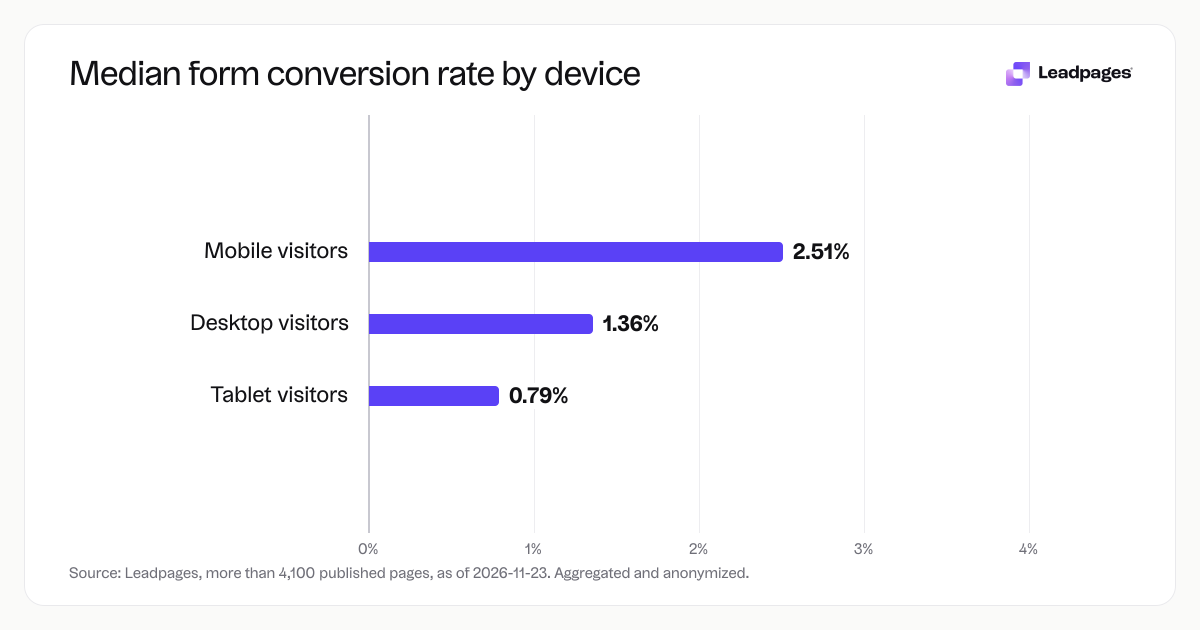
Done well, a mobile pop up helps you collect leads from visitors who might leave without acting. Across pages published with Leadpages, the median form conversion rate for mobile visitors is 2.51% over 90 days (more than 4,100 pages). For desktop visitors that median is 1.36%, and for tablet visitors it is 0.79%. These are page forms rather than pop-ups, and they describe past pages, not what yours will do.
The steps below show how to build a mobile pop up that converts. The advice works with any page builder, and we also show how to do each step in Leadpages.
Leadpages data
Form conversion rates for pages published with Leadpages, by device, over the 90 days to 2026-11-22. A form conversion rate is the share of visits to a page in which the visitor submitted its form. Each figure is a median or quartile across pages. It describes the pages in a group, not what causes the difference between groups.
more than 4,100 published pagesAs of November 23, 2026
| Measure | Value |
|---|---|
| Median form conversion rate, mobile visitors | 2.51% |
| Median form conversion rate, desktop visitors | 1.36% |
| Median form conversion rate, tablet visitors | 0.79% |
Median form conversion rate, mobile visitors
Median form conversion rate, desktop visitors
Median form conversion rate, tablet visitors
Based on more than 4,100 published pages. As of November 23, 2026.
How to build a mobile pop up, step by step
1. Decide the pop up's job and timing
Choose a single goal. Common goals include:
- Getting email signups for a newsletter
- Offering a first-time visitor discount
- Promoting a free resource like a checklist or template
- Reducing cart abandonment on an ecommerce site
Pick one clear outcome. A pop up that tries to do two things usually does neither well.
Then set when it should appear. On a phone, a pop up that shows the moment someone lands often annoys people and increases bounces. Better triggers include:
- After a visitor has scrolled past the halfway point of the page
- After someone has been on the page for 30 seconds or more
- When a desktop visitor moves the cursor toward the address bar (exit intent). Phones have no cursor, so don't count on exit intent there
- On a specific interaction, like tapping a button or link
Leadpages pop-ups can open after a delay, at a scroll depth, on exit intent or when someone taps a button or link, and you can add one to any page you build with the landing page builder or the AI page builder. Check each trigger on a real phone before launch.
2. Design for thumbs and small screens
Mobile screens are narrow, so every pixel counts. Follow these practical rules:
- Use a single-column layout. Do not try to fit sidebars or multi-column content into a pop up.
- Keep the form short. Ask for a first name and email, or just an email. More fields mean more drop-offs.
- Make text large enough to read without zooming. Body text should be at least 16px.
- Size buttons for thumbs. A minimum height of 44px is a reliable target.
- Add generous spacing around fields so visitors do not tap the wrong one.
Check the pop up on different screen sizes. A pop up that looks fine on a large phone may break on a smaller device. Use a preview tool to test at 375px wide (iPhone 6/7/8) and 414px (iPhone 11/XR) at minimum.
In Leadpages, start from a template in the template library and change the colors, fonts and images to match your brand. A brand kit keeps your brand styles in one place for the pages you build.
3. Write short, direct copy
The headline should state the benefit in a few words. For example: "Get a discount on your first order" or "Free guide: 7 ways to improve your checkout".
Body copy should be one or two short sentences that reinforce the value. If you offer a discount, note any minimum purchase. If you offer a download, name the format or length.
Use a clear call-to-action on the button. Replace "Submit" with "Send me the guide" or "Get my code". For headline or button ideas, use the free Headline Analyzer and CTA Generator.
4. Set up the form and connect it to your email tool
A pop up has no value if the leads do not go anywhere. Connect the form to your email marketing tool, CRM, or a spreadsheet.
Most tools integrate directly or via Zapier. Decide where new leads should land, set up the connection before you publish, then test it. Submit a dummy entry and confirm it arrives in the right list.
Leadpages form collection connects to 19 native integrations, including Mailchimp and HubSpot, and can send each submission to Zapier or any other endpoint with a webhook.
5. Test on real devices before launch
Do not rely on desktop previews alone. Open the page on an actual phone and tablet. Check:
- Load time: Does the pop up slow the page? If so, reduce image sizes or delay the trigger.
- Close button: Is it visible and easy to tap? A small or hidden X can drive people away.
- Keyboard overlap: When someone taps a field, does the keyboard cover the field or button? Adjust position or scroll so all elements stay accessible.
- Error messages: Submit with an empty field. Does the message read clearly and appear in the right place?
Ask a colleague or friend to test it on their device without coaching. Watch where they tap and whether they understand the offer.
6. Publish and track performance
After fixing issues, publish the page with the pop up live. For the first week, watch:
- Impressions: How many people see the pop up
- Conversion rate: The share of viewers who complete the form
- Close rate: How many close the pop up without acting
- Overall page bounce rate: Whether the pop up causes more visitors to leave quickly
You can track these in the analytics dashboard of your page builder. If the conversion rate is low, test one change at a time: the headline, the offer, the number of fields, or the trigger timing. Use an A/B test calculator to know when you have enough data to decide.
Leadpages includes A/B testing built-in, so you can split traffic between two versions and see which one converts more reliably.
Fixing common mobile pop up problems
Pop up covers the entire screen on load
Google's guidance says pages can rank lower on mobile when a pop-up covers the main content, whether it appears as someone arrives or while they read. Banners that use a reasonable amount of screen space, and legally required notices like cookie or age checks, aren't affected. Use a smaller banner, or open the full pop-up only when someone taps a button.
Close button is too small or hard to find
If the X is tiny or blends into the background, visitors may get stuck and leave. Make the close button at least 44px tall, place it top right, and use a color that contrasts with the background. Test on different phone models.
Form fields are cut off by the keyboard
On many phones, when the keyboard opens, it can push the pop up off screen or hide the submit button. Some builders let you keep the form centered or auto-scroll it into view. Test this on iOS and Android. If the builder does not handle it, reduce the pop up height so it fits in the visible area with the keyboard open.
The offer feels unrelated to the page
A generic "Sign up for our newsletter" on a product page often gets ignored. Match the pop up to the content. On a service page, offer a related case study or demo. On a pricing page, a discount can fit. On a blog post, a content upgrade works better.
Too many fields hurt completion
Every extra field lowers the chance someone finishes. For a first touch, ask only for an email. Collect more data later through a follow-up email or progressive profiling.
The same visitor sees the pop up too often
If someone closes your pop up, showing it on every visit can irritate repeat visitors. Most tools let you set a cookie so the pop up stays hidden for a set period (for example 30 days) after a close or conversion. Use that feature.
What to do after you launch your mobile pop up
Once the pop up is live, improve it with real data. Use this routine:
- Check analytics for the first 7 days. Note view rate, conversion rate, and any change in page bounce rate.
- If conversion is below your target, change one element. Let it run for a week.
- Record the change and the result in a simple spreadsheet. Over time, you build a playbook for your audience.
- Test seasonal offers or new lead magnets. A holiday discount may slow down in January.
- Add an email follow-up that delivers the discount or guide within minutes of signup. A quick win builds trust and can lead to a second step.
For a broader view of how your pop up fits the page, use the free Landing Page Analyzer to score the whole page. It gives practical suggestions on load time, copy, and layout.
You can also run a formal A/B test between two pop up designs. For example, test a discount code against a free resource, or a slide-in against a centered window. Use Leadpages A/B testing to split traffic evenly and wait until you have enough data to choose a winner confidently.
If you use other channels, match the pop up to the ad or email that brought the visitor. Visitors are more likely to fill in the form when the pop-up repeats what the ad or email said. For paid social traffic, see landing pages for paid social. For search ads, see landing pages for paid search.
When you are ready to build your own mobile pop up, start with a free trial. You can test designs, connect your email tool and start collecting leads. Start building free.
How we got those numbers: The form conversion rates above are medians across more than 4,100 pages published with Leadpages, over the 90 days to 2026-11-22. A form conversion rate is the share of visits to a page in which the visitor submitted its form. The data is aggregated and anonymized as of 2026-11-23. It describes the pages in a group, not what causes the difference between groups.