
How-to guides
How to Add a Pop Up for Shopify That Converts
Add a pop up for Shopify that collects emails: build it in Leadpages, paste its code into your theme, set triggers and fix common problems.
A pop up on Shopify is a small window that appears over your store's content. It asks the visitor to do one thing: share an email, claim a discount, or view a limited-time offer. It gives a casual browser a reason to leave an email you can market to later. You can build a popup with your theme's settings (some themes include a newsletter pop-up), a third-party app from the Shopify App Store, or a dedicated landing page and popup builder like Leadpages. The right popup, shown at the right moment, can catch people who would otherwise leave without buying or signing up.
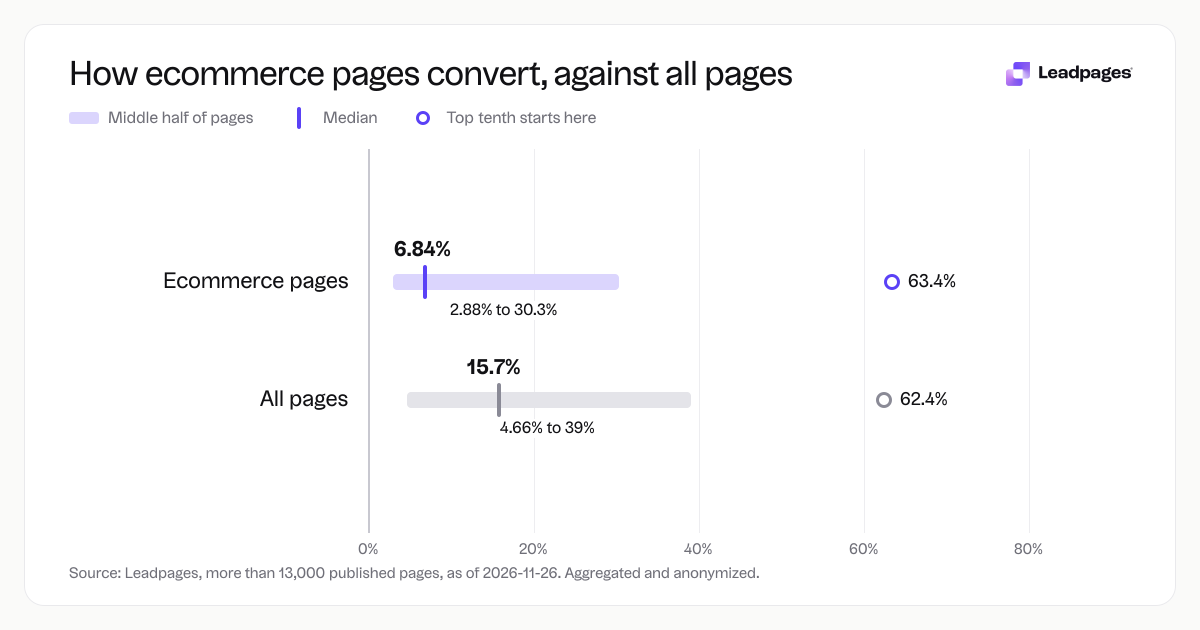
Across ecommerce pages published with Leadpages, the median conversion rate is 6.84%, and the top quarter of those pages convert above 30.3%. These figures come from more than 13,000 Leadpages Classic pages that recorded conversions, measured as conversions per unique visitor over each page's lifetime. They describe full landing pages, not pop-ups, but a pop-up works on the same idea: one offer, few distractions and a small ask.
Leadpages data
Conversion rates for ecommerce published with Leadpages, compared with all pages
more than 13,000 published pagesAs of November 26, 2026
6.84%
Median conversion rate, ecommerce pages
2.88%
Bottom quarter converts below, ecommerce pages
30.3%
Top quarter converts above, ecommerce pages
| Measure | Value |
|---|---|
| Median conversion rate, ecommerce pages | 6.84% |
| Bottom quarter converts below, ecommerce pages | 2.88% |
| Top quarter converts above, ecommerce pages | 30.3% |
| Top tenth converts above, ecommerce pages | 63.4% |
| Share converting at 10% or better, ecommerce pages | 41.2% |
| Median conversion rate, all pages | 15.7% |
| Bottom quarter converts below, all pages | 4.66% |
| Top quarter converts above, all pages | 39% |
| Top tenth converts above, all pages | 62.4% |
| Share converting at 10% or better, all pages | 59.9% |
Median conversion rate, ecommerce pages
Bottom quarter converts below, ecommerce pages
Top quarter converts above, ecommerce pages
Top tenth converts above, ecommerce pages
Share converting at 10% or better, ecommerce pages
Median conversion rate, all pages
Bottom quarter converts below, all pages
Top quarter converts above, all pages
Top tenth converts above, all pages
Share converting at 10% or better, all pages
Based on more than 13,000 published pages. As of November 26, 2026.
How to create a pop up in Shopify (step by step)
1. Pick a goal for your pop up on Shopify
Before you open a builder, write down what the popup should do. Common goals:
- Collect email addresses for a newsletter or product launch.
- Offer a first-purchase discount.
- Promote free shipping on orders over a certain amount.
- Remind visitors about items left in their cart (for cart-abandonment popups).
- Grow an SMS marketing list.
For example, an online coffee shop might use a popup that says "Get our brewing guide free when you sign up." An apparel store might run a seasonal popup that offers a first-order discount in exchange for an email.
2. Choose how to build your Shopify pop up
You have three main paths:
- Use a popup app from the Shopify App Store (Privy, Justuno, OptinMonster). These apps handle the tech and give you templates.
- Add a custom HTML/CSS popup through your theme's code. This works if you have a developer and want something basic, but you give up built-in analytics and A/B testing.
- Use a pop-up builder outside Shopify. Leadpages lets you build pop-ups, landing pages and lead capture forms. You design the pop-up in Leadpages, then paste its publishing code into your Shopify theme. This route gives you templates, triggers, A/B testing and analytics in one place.
3. Build the popup design
If you use Leadpages, start from a popup template and edit it in the visual editor. If you'd rather send visitors to a full page, the AI page builder can draft a landing page from a description of your offer and audience.
Key design rules for a Shopify popup:
- Use a headline that states the benefit. "Get a discount on your first order" is clearer than "Sign up for news and offers".
- Keep the form short: email field, maybe a name field. Fewer fields usually means more signups.
- Use a button with an action-oriented label: "Get my discount", "Download the guide", "Yes, I want it".
- Include a clear close button (an X in the top corner, not tiny text).
- On mobile, reduce the image or remove it, and make the button full width.
4. Set when and where the popup appears
Good popups use triggers that respect the visitor's experience. In Leadpages you can choose:
- Exit intent: detects mouse movement toward the browser's close button or address bar. Works well on product and cart pages.
- Time on page: for example, show after 20 seconds. Good for blog posts or collection pages where the visitor has had time to browse.
- Scroll depth: show after the visitor scrolls past halfway down the page. Useful for long-form content.
- Click trigger: the popup appears only when someone clicks a button or link. Good for a "Join waitlist" or "Download now" link.
Also limit how often the same visitor sees it. For a timed pop-up, Leadpages lets you choose how many days to wait before it shows again, for example 7.
5. Add the pop up to your Shopify theme
To install a Leadpages popup on your Shopify store:
- In Leadpages, open the pop-up's publishing options and copy its code. It has two parts: a script that loads the pop-up and the trigger code.
- In Shopify admin, go to Online Store > Themes, click the ... button next to your current theme, and choose Edit code.
- Open theme.liquid, paste the code just before the closing head tag, and save. The pop-up can now load on every page that uses that theme layout.
- For a pop-up that opens on a click, place the trigger part on the button or link where you want it to open.
Shopify's separate Leadpages integration is for landing pages: connect your store to show product details on a Leadpages page and send visitors to your Shopify checkout.
6. Connect the form to your email or CRM
Every email address you collect needs to land somewhere you can act on it. Leadpages forms integrate directly with tools like Klaviyo, Mailchimp, ActiveCampaign, HubSpot, and Salesforce. You can also send submissions to Zapier or any other tool with a webhook. Choose your integration and map the fields, then set up a welcome email in your email tool that sends the discount code or guide right after signup.
7. Test and publish
Before you set the popup live, open your Shopify store on a desktop browser and a phone. Check:
- The popup appears when and where you intended.
- The form submits correctly and you receive the thank-you message.
- The email integration fires and the contact appears in your list.
- The close button works and is easy to tap on mobile.
- The popup does not cover the main content or make the store feel broken.
Once it is live, watch the numbers for the first few days. Leadpages analytics show popup impressions, submissions and conversion rate.
Common problems with Shopify popups (and how to fix them)
The popup shows too fast and annoys visitors
Adjust the trigger. Switch from immediate to a 15-second delay or an exit-intent rule. Check your analytics: if many visitors close the popup without engaging, it is either the timing or the offer.
Mobile visitors can't close the popup
Make the close button bigger and easier to tap. For mobile, consider an inline form instead of a traditional overlay popup. A banner at the top or bottom of the screen can be less intrusive.
The popup doesn't match your store's brand
Use your store's colors, fonts and logo in the pop-up editor so it looks like part of the store.
Low conversion rate even though the popup is seen
Run an A/B test. Change one element: the headline, the offer, the image, or the button color. For example, an eco-friendly store might test "Join our community" against "Get a discount on sustainable living tips". Use the A/B testing feature in Leadpages to split traffic. For reference, the top tenth of Leadpages ecommerce pages convert above 63.4%, though that figure covers full pages, not pop-ups. A free A/B test significance calculator helps you know when the result is statistically sound.
The popup slows down your Shopify store
Keep the pop-up's images small and compressed, and check your store's load time on a phone after you add the code. If pages slow down, cut the image or simplify the design.
People give fake email addresses
Offer something they genuinely want, not something generic. A discount code that applies at checkout is a stronger incentive than a vague "newsletter". You can also use double opt-in, where the subscriber confirms via email, to keep your list clean.
What to do after your popup is live
Once the pop-up is live, keep adjusting it:
- Review your conversion rate weekly. Across ecommerce pages published with Leadpages, the bottom quarter convert below 2.88%. If your popup is near that line, change your offer or timing.
- Test, then test again. Create an A/B test at least once a quarter. If you run paid traffic, test more often. For example, an online course seller might test a free lesson download against a discount on the full course. Use a free headline analyzer to score your popup's headline before you launch a test.
- Segment your popup audiences. Show different offers to different visitors. A returning visitor might get a loyalty discount, while a first-time visitor sees a lead magnet.
- Follow up fast. The email that arrives after someone subscribes decides whether they buy. Set up an automated email sequence that delivers the discount or guide and then introduces your bestsellers. If your popup offers a discount, make sure the code works.
- Expand to dedicated landing pages. Once you see which offers work in a popup, build a full landing page for the same offer. Landing pages give you more room to persuade and can convert well. The median conversion rate for ecommerce pages published with Leadpages is 6.84%, and the top quarter convert above 30.3%. A landing page tied to an ad or email campaign can help you move toward those numbers.
- Use analytics to spot patterns. If your analytics show Instagram visitors sign up more often than search visitors, build a pop-up offer for that audience.
You can start building a popup for Shopify today with a free trial of Leadpages. It includes the pop-up builder, templates, A/B testing and analytics. Start building free.