
How-to guides
How to Build a Webinar Funnel That Turns Viewers Into Leads
How to build a webinar funnel: step-by-step guide, common problems, and what to do after. Includes real conversion data from 13,000+ landing pages.
A webinar funnel is the path someone follows from first seeing your topic to attending your presentation and, if it fits, becoming a customer. It includes a registration page, a thank-you page, reminder emails, the webinar, and a follow-up offer. You can build one with most landing page tools.
Leadpages data
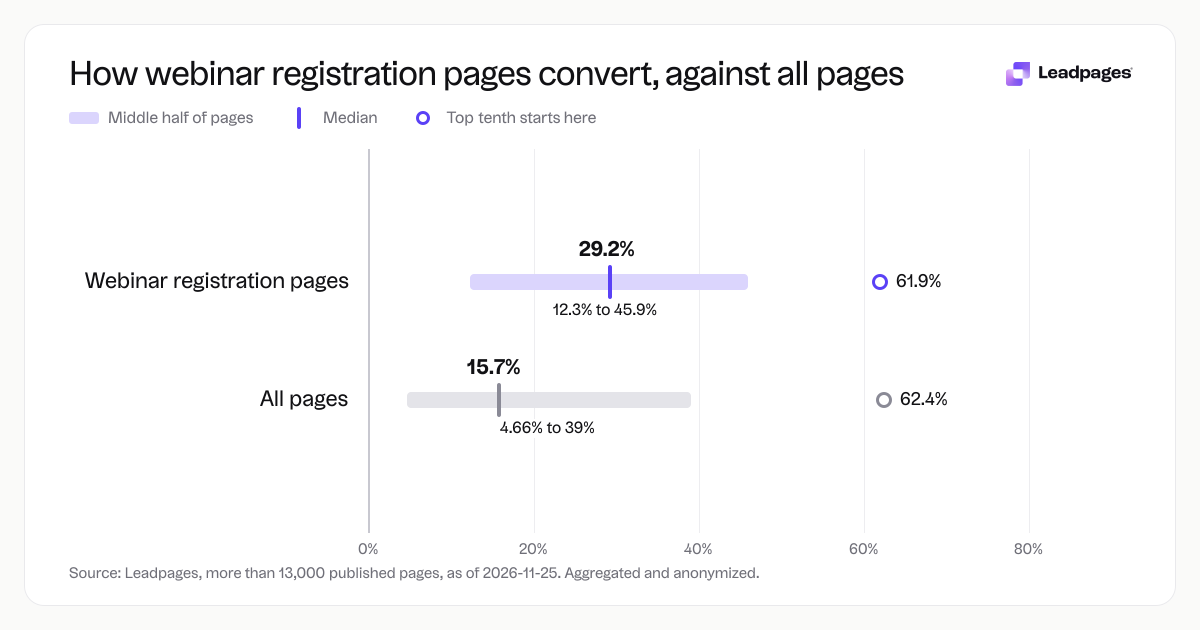
Conversion rates for webinar registration pages published with Leadpages, compared with all pages
more than 13,000 published pagesAs of November 25, 2026
29.2%
Median conversion rate, webinar registration pages
12.3%
Bottom quarter converts below, webinar registration pages
45.9%
Top quarter converts above, webinar registration pages
| Measure | Value |
|---|---|
| Median conversion rate, webinar registration pages | 29.2% |
| Bottom quarter converts below, webinar registration pages | 12.3% |
| Top quarter converts above, webinar registration pages | 45.9% |
| Top tenth converts above, webinar registration pages | 61.9% |
| Share converting at 10% or better, webinar registration pages | 79% |
| Median conversion rate, all pages | 15.7% |
| Bottom quarter converts below, all pages | 4.66% |
| Top quarter converts above, all pages | 39% |
| Top tenth converts above, all pages | 62.4% |
| Share converting at 10% or better, all pages | 59.9% |
Median conversion rate, webinar registration pages
Bottom quarter converts below, webinar registration pages
Top quarter converts above, webinar registration pages
Top tenth converts above, webinar registration pages
Share converting at 10% or better, webinar registration pages
Median conversion rate, all pages
Bottom quarter converts below, all pages
Top quarter converts above, all pages
Top tenth converts above, all pages
Share converting at 10% or better, all pages
Based on more than 13,000 published pages. As of November 25, 2026.
What a webinar funnel does and why it works
A live or automated webinar suits businesses that sell a service, a course, or a consulting package. It gives you time to teach and build trust before you ask for the sale. Instead of asking a cold visitor to buy a high-ticket program, you invite them to spend an hour learning something useful for free.
The funnel breaks the buying decision into smaller steps: sign up, show up and watch, then consider the offer. By the time you present your product, the person has seen how you work.
A small business example: a bookkeeping firm hosts a free 45-minute webinar on "How to cut your tax bill without dodgy shortcuts." The registration page names two specific takeaways. The thank-you page confirms the registration and asks the attendee to save the date. Two reminder emails and a last-minute text reduce no-shows. On the webinar, the bookkeeper covers those tips, then introduces a done-for-you tax planning service. The follow-up email links to the replay and restates the offer.
Build your webinar funnel: step by step
The steps work in any builder. Where Leadpages has a shortcut, it's noted in the step.
1. Choose a topic and an offer that fit
Pick a topic that solves a clear, urgent problem for your ideal customer. If you sell a course on getting freelance clients, your webinar could be "How to land your first three clients in 30 days." The offer at the end should be the next logical step after the lesson. The same person who wants the free lesson should see the value in the paid offer.
Write down the one thing attendees will learn. Then decide what you'll sell. If the product is not ready yet, you can still build the funnel and collect registrations to gauge interest.
2. Build the registration page
The registration page is there to get the form filled, so keep the headline direct and about the benefit. For example: "Free workshop: How to cut your tax bill (two specific strategies you can use this quarter)."
Under the headline, add two or three bullets that state what they'll learn. Include the date and time, a short host bio, and a form with as few fields as possible. Name and email address are enough for most webinars.
Across pages published with Leadpages, the median conversion rate for webinar registration pages is 29.2%. The top quarter of these pages convert above 45.9%, and the top tenth convert above 61.9%. These figures come from more than 13,000 Leadpages Classic pages that recorded conversions, measured as conversions per unique visitor over each page's lifetime.
If you're building with Leadpages, you can start from a webinar-specific template in the template gallery. Drag and drop your text and images using the landing page builder. If you want to start from a brief, the AI page builder can generate a first draft from a few sentences about your webinar. Once the page is live, run your headline through the free headline analyzer and use A/B testing to try two versions and see which one converts higher.
3. Create the thank-you page and confirmation
After someone registers, show a thank-you page that confirms the sign-up and tells them what to do next. Avoid anything on this page that distracts from the next step.
A solid thank-you page includes:
- A confirmation message ("You're registered").
- The date, time, and a link to add the event to their calendar.
- Instructions to check their inbox for the confirmation email (and a note to look in spam).
- Optionally, a short survey about what they want to learn, which helps you tailor the content.
In Leadpages, you can build the thank-you page the same way you built the registration page. Use the form collection settings to store the email address and pass it to your email marketing tool. Most email platforms accept a direct integration, so the contact gets added to your sequence automatically.
4. Set up the email reminder sequence
The email sequence keeps your webinar top of mind without being pushy. Send at least three emails: one immediately after registration with the calendar link, one the day before, and one an hour before the event. If you run an automated webinar, a "starting soon" email goes out when the person triggers the replay.
Keep each email short. Remind the person what they will gain from attending. A subject line like "Tomorrow: How to cut your tax bill" beats a generic "Reminder: Your webinar registration."
Use your email marketing tool of choice. The registration form feeds the contact into the right list or tag.
5. Host the webinar (live or automated)
A live webinar creates energy and lets you answer questions on the spot. An automated webinar runs at the attendee's convenience and scales without your time. To make an automated version feel immediate, offer a bonus that expires shortly after viewing.
During the webinar, spend most of the time teaching what the registration page said they'd learn. Then transition cleanly to your offer. Show what the product does, add testimonials or a case study, and state the price clearly.
6. Follow up with the replay and the offer
Send the replay link within a few hours of the live event, along with a reminder of any limited-time bonus or discount. Send two or more emails over the next few days, each adding a reason to buy or answering an objection you heard during Q&A.
Use the same email platform you used for reminders, but segment the list: send one sequence to people who attended, another to those who registered but did not show. Non-attendees may need an extra nudge to watch the replay first, then a softer pitch because they are colder.
Common webinar funnel problems and how to fix them
Low registration rate
If your page is not converting, start with the headline. A vague headline gives the visitor no reason to fill the form. Swap it for something specific that names the outcome.
Next, check the form. If you are asking for a phone number and company name along with the email, test cutting those extra fields. If your page converts below 12.3% (the bottom quarter in the same data), test the headline and the form first.
Then review your traffic source. If you are driving cold ad traffic, the page may need more social proof: a short testimonial, the number of past attendees, or a mention of a publication you have been featured in.
High no-show rate
Use a dedicated calendar link on the thank-you page so attendees can add the event with one click. Send a text reminder if you collect a phone number. Subject lines in your reminders matter: mention the benefit ("How to cut your tax bill tomorrow night") rather than just the fact of the event.
Low offer conversion
If people attend but do not buy, the issue is usually the offer or the transition. The offer should connect tightly to the teaching. If you taught strategy, sell a course. If you taught a specific tactic, sell done-with-you help. Do an honest check: is the price clear? Did you give enough specific proof? A short, plain-English replay landing page with a video and a button helps, because many attendees will want to reconsider the offer later.
What to do after you launch your webinar funnel
Track the numbers that show where the funnel leaks: registration page conversion, attendee rate, offer conversion. Once you know the weakest step, test one change at a time.
To judge a change properly, you need to know if the result is real or just noise. Use a free A/B test calculator to check statistical significance before you decide a new headline or image is a winner.
For the registration page, test the headline first, then the form, then the color or placement of the button. Leadpages includes built-in A/B testing so you can run a test without duplicating the page. The analytics dashboard shows conversions, traffic sources, and the top pages at a glance.
As the funnel matures, consider creating different registration pages for different audiences. If you run paid social ads, point each ad to a page that repeats what that ad offered, instead of a single catch-all page.
If you are building with Leadpages, clone your best registration page, swap the headline and hero image for the new audience, and keep the rest the same. The free landing page analyzer gives you a quick score and suggestions before you push a page live.
Start building your webinar funnel with a free trial. No code, no waiting on a developer. Pick a template, add your copy, and publish.
The conversion figures in this guide come from an analysis of more than 13,000 published pages. The data is aggregated and anonymized; as of 2026-11-25. They describe the pages in the data, not what any one page will do.