
How-to guides
How to Build a Squeeze Page That Grows Your Email List
A squeeze page collects email addresses in exchange for a lead magnet. Learn how to create one that converts, step by step, with data on top performers.
A squeeze page is a short, standalone page with one job: get a visitor's email address. You trade something the visitor wants (a lead magnet like a checklist, template or free course) for their contact information. Every element on the page pushes toward that single action, which is why squeeze pages often convert higher than longer, multi-goal landing pages.
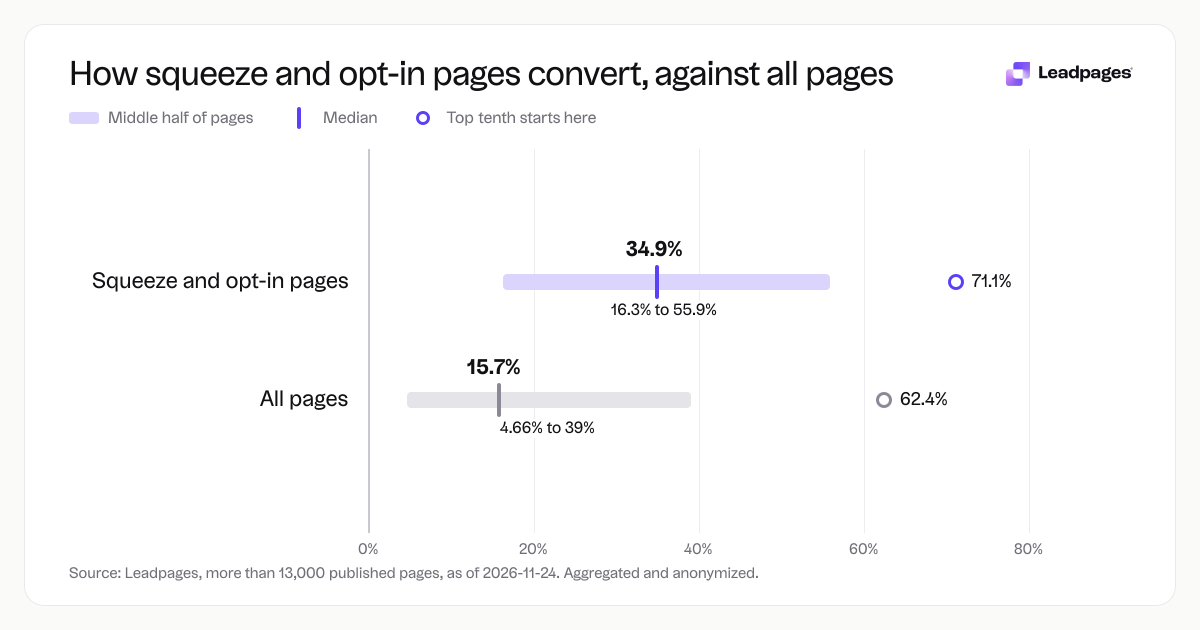
Across more than 13,000 pages published with Leadpages, squeeze and opt-in pages have a median conversion rate of 34.9%. The top quarter of those pages convert above 55.9%, and the top tenth convert above 71.1%. By comparison, the median across all page types is 15.7%. That gap suggests what a focused offer and low-friction page design can do.
These figures come from more than 13,000 Leadpages Classic pages that recorded conversions, measured as conversions per unique visitor over each page's lifetime.
Leadpages data
Conversion rates for squeeze and opt-in pages published with Leadpages, compared with all pages
more than 13,000 published pagesAs of November 24, 2026
34.9%
Median conversion rate, squeeze and opt-in pages
16.3%
Bottom quarter converts below, squeeze and opt-in pages
55.9%
Top quarter converts above, squeeze and opt-in pages
| Measure | Value |
|---|---|
| Median conversion rate, squeeze and opt-in pages | 34.9% |
| Bottom quarter converts below, squeeze and opt-in pages | 16.3% |
| Top quarter converts above, squeeze and opt-in pages | 55.9% |
| Top tenth converts above, squeeze and opt-in pages | 71.1% |
| Share converting at 10% or better, squeeze and opt-in pages | 83.2% |
| Median conversion rate, all pages | 15.7% |
| Bottom quarter converts below, all pages | 4.66% |
| Top quarter converts above, all pages | 39% |
| Top tenth converts above, all pages | 62.4% |
| Share converting at 10% or better, all pages | 59.9% |
Median conversion rate, squeeze and opt-in pages
Bottom quarter converts below, squeeze and opt-in pages
Top quarter converts above, squeeze and opt-in pages
Top tenth converts above, squeeze and opt-in pages
Share converting at 10% or better, squeeze and opt-in pages
Median conversion rate, all pages
Bottom quarter converts below, all pages
Top quarter converts above, all pages
Top tenth converts above, all pages
Share converting at 10% or better, all pages
Based on more than 13,000 published pages. As of November 24, 2026.
What a squeeze page does (and when you need one)
A squeeze page is not a full sales page or a home page. It removes everything that could distract someone from filling out the form. You see a headline, a short description of the offer, the form itself (usually just an email field, sometimes a name field) and a call-to-action button. No navigation menu, footer links or social feeds.
Use a squeeze page when your main goal is list growth. Common lead magnets include:
- An ebook or guide
- A video training or mini-course
- A free consultation or audit
- A discount code
- A webinar registration
- A swipe file or template
If your offer asks only for an email address, a squeeze page is often the simplest path to a high conversion rate. If the offer asks for more details (phone number, company size, budget), you might need a longer landing page. For email-only asks, less is usually more.
How to build a squeeze page: step by step
These steps work with any page builder. Once you know the principles, you can execute them inside Leadpages or the tool you already use.
1. Define the offer and the audience Before you open a page builder, decide what you are giving away and who it is for. Write a single sentence that states the lead magnet and the result it helps someone reach. Example: "A 5-day email course that helps freelance designers find better clients." If you cannot describe the offer in one sentence, the page will struggle to communicate it.
2. Write the headline The headline tells the visitor what they get and why it matters. Keep it under 15 words. Mention the offer and the outcome. Use clear, everyday language. For example, "Get the 5-day email course that helps freelance designers land better clients." Avoid wordplay that hides the value.
Use the free headline analyzer to see where you can sharpen it. A small reword can lift conversions.
3. Add a short description Below the headline, add two or three sentences that explain what the lead magnet includes and the problem it solves. Use bullet points if the offer has distinct parts. Keep the description brief. A visitor should understand the offer in five seconds or less.
4. Build the form A squeeze page form typically asks for a first name and an email address, or just an email address. Test whether asking for a name reduces submissions. A single field lowers friction, but test it against two fields before you decide. With Leadpages, you can drag a lead capture form onto the page and connect it to your email platform.
Set the button copy so it repeats the action the visitor is taking. "Send me the course" or "Get the checklist" usually beats "Submit." If you need inspiration, try the call-to-action generator for phrasing tied to your offer.
5. Add any trust elements A short testimonial or a small logo strip of brands you have worked with can build credibility. An image of the lead magnet (a book cover or a mockup) makes the offer feel real. Keep these elements small so they do not push the form below the fold. On mobile, the form should be visible without scrolling.
6. Design the page to remove distractions Remove the header navigation, footer links and sidebar. Use a single-column layout. Make the form and button the most visible elements on the page. White space around the offer helps the eye land where you want it.
Leadpages includes a gallery of landing page templates built for opt-in offers. You can start from one of those and adjust colors and images to match your brand using the brand kit. If you want a first draft fast, the AI page builder can create a squeeze page from a description of your offer and audience. You can then fine-tune all the details.
7. Set up the thank-you page and delivery After someone submits the form, send them to a simple thank-you page that tells them what to do next (check their inbox, confirm their email, click the link). If you deliver the lead magnet immediately, put the download link on that page and trigger an automated email.
8. Test before you drive traffic Fill out the form yourself on desktop and mobile. Confirm the email integration sends the right message. Check page speed with the free landing page analyzer to catch anything slowing load time. Pages that take more than three seconds to load can lose a meaningful share of visitors.
9. Drive traffic and start testing Send paid search or paid social traffic to the page, or promote it on your website and social channels. Once you have a few hundred visitors, start A/B testing one element at a time. Headlines, button colors and form field count are all good starting points. Leadpages includes built-in A/B testing so you can test variants and see which one wins. As you get more data, the A/B test significance calculator helps you know when a result is reliable.
If you run a squeeze page inside a larger paid campaign, see the guide on landing pages for paid search and landing pages for paid social for ideas on matching ad copy to page copy.
Squeeze page problems (and how to fix them)
Low conversion rate If your page is converting below 16.3% after a few hundred visitors (the bottom quarter in our data), the issue is usually the offer, the headline or the traffic source. Ask a few members of your target audience to read the page and tell you what they think the offer is worth. If the value is unclear, rewrite the headline and description. If the traffic source sends visitors who are not ready for the offer (for example, a broad Facebook ad that reaches people outside your niche), tighten your targeting before you change the page.
Too many form fields Every field you add reduces conversion. Unless you need extra information to qualify a lead, keep the form to email only. If you need a name, test a one-field form against a two-field form to see the actual drop-off. The difference often surprises people.
Mobile layout breaks A squeeze page that works on desktop can feel cramped on a phone. Test your page on a few real devices. The headline should be short enough to read fast. The form fields and button must be large enough to tap with a thumb. In Leadpages, the landing page builder lets you adjust mobile spacing and font sizes separately from the desktop view, so small tweaks do not break the desktop layout.
Page loads too slowly Images that are not compressed, custom fonts, or heavy scripts can add seconds to load time. Use the landing page analyzer to identify bottlenecks and swap large asset files for smaller versions. Our page speed benchmark data shows that faster pages tend to convert above the median more often.
Offer feels generic A "free marketing guide" will convert worse than "The 7-step Facebook Ads checklist for yoga studio owners." Specificity helps. Name the exact result, format and audience in the headline and description.
What to do after you publish
Once the page is collecting emails, your focus shifts to traffic and optimization.
- Send consistent traffic. Use one or two channels to start (paid search, organic social, an email mention to your existing list) and measure which source produces the highest conversion rate. An aggregated analysis of Leadpages data across traffic sources shows consistent patterns, but your offer might surprise you, so let your own analytics decide.
- Watch the analytics. Check the page's conversion rate, bounce rate and average time on page weekly. In Leadpages, the analytics dashboard shows these metrics without a separate tracking setup.
- Run A/B tests monthly. Even a small lift compounds. Change one element, wait for a statistically clear result, then test the next thing.
- Build a second page for a different segment. Once you have a squeeze page that works for one audience, create a version with a different lead magnet or headline for another audience. Small businesses often find that a personalized approach to different customer groups lifts conversion across the board.
- Keep the offer fresh. If a lead magnet goes out of date (old data, expired training), replace it. A stale offer will slow your list growth and hurt your reputation.
Start building a squeeze page with a free trial, then watch what your own audience does.
The conversion data in this article comes from an analysis of more than 13,000 pages published with Leadpages, aggregated and anonymized as of November 24, 2026.