
How-to guides
How to Increase Your Ecommerce Conversion Rate: Practical Steps That Work
Practical steps to increase ecommerce conversion rates. Data from 13,000+ pages: median 6.84%, top quarter above 30.3%. Apply these methods.
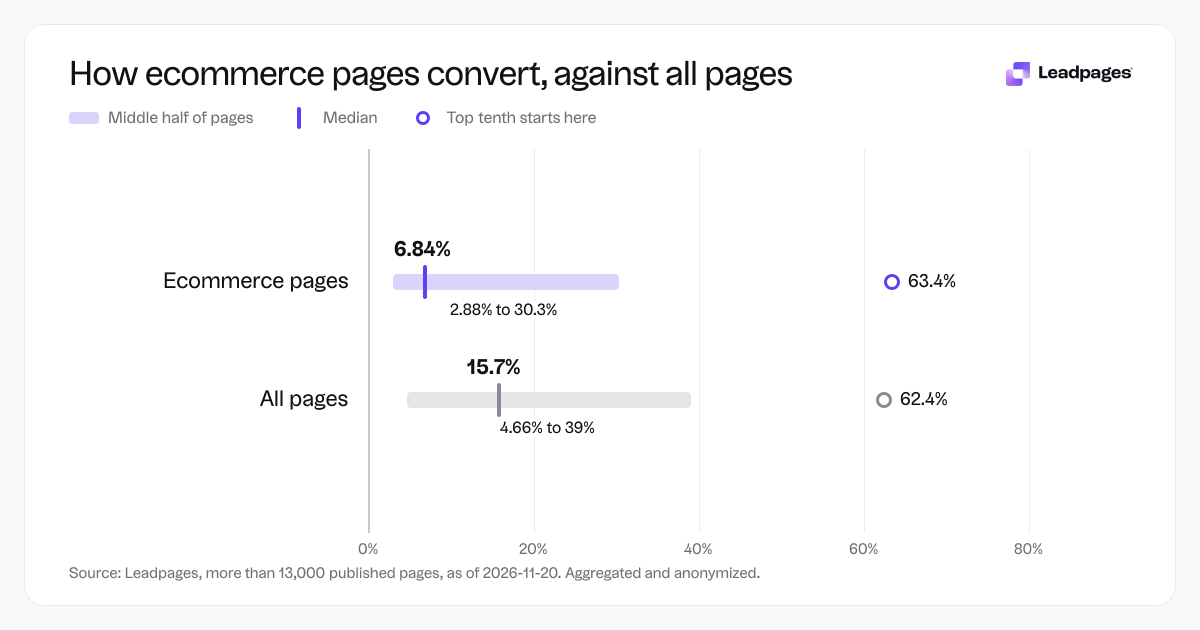
To increase your ecommerce conversion rate, make the path from visitor to buyer clear, fast, and convincing. This guide gives you a step-by-step plan, backed by data from more than 13,000 published pages on Leadpages. The median conversion rate for ecommerce pages in that set is 6.84%, while the top quarter convert above 30.3%, which shows how much room there is to improve.
Leadpages data
Conversion rates for ecommerce published with Leadpages, compared with all pages
more than 13,000 published pagesAs of November 20, 2026
6.84%
Median conversion rate, ecommerce pages
2.88%
Bottom quarter converts below, ecommerce pages
30.3%
Top quarter converts above, ecommerce pages
| Measure | Value |
|---|---|
| Median conversion rate, ecommerce pages | 6.84% |
| Bottom quarter converts below, ecommerce pages | 2.88% |
| Top quarter converts above, ecommerce pages | 30.3% |
| Top tenth converts above, ecommerce pages | 63.4% |
| Share converting at 10% or better, ecommerce pages | 41.2% |
| Median conversion rate, all pages | 15.7% |
| Bottom quarter converts below, all pages | 4.66% |
| Top quarter converts above, all pages | 39% |
| Top tenth converts above, all pages | 62.4% |
| Share converting at 10% or better, all pages | 59.9% |
Median conversion rate, ecommerce pages
Bottom quarter converts below, ecommerce pages
Top quarter converts above, ecommerce pages
Top tenth converts above, ecommerce pages
Share converting at 10% or better, ecommerce pages
Median conversion rate, all pages
Bottom quarter converts below, all pages
Top quarter converts above, all pages
Top tenth converts above, all pages
Share converting at 10% or better, all pages
Based on more than 13,000 published pages. As of November 20, 2026.
What Increasing Ecommerce Conversions Really Takes
Improving ecommerce conversion rates comes down to removing friction and strengthening motivation. Friction is anything that makes a visitor hesitate: a slow site, unclear navigation, too many form fields, or a checkout that asks for unnecessary details. Motivation comes from how well you show value, build trust, and create urgency.
Ecommerce pages tend to convert lower than lead generation pages because buying is a higher-commitment action than filling out a form. Across all page types on Leadpages, the median is 15.7%, while ecommerce pages sit at 6.84%. Even so, 41.2% of ecommerce pages on Leadpages achieve double-digit conversion rates, and the top tenth exceed 63.4%. Careful page building and steady testing create those gains.
Steps to Raise Your Ecommerce Conversion Rate
1. Define what a conversion means for this page
Before you change anything, pin down the exact action you want a visitor to take. On a product page, it might be “add to cart.” On a landing page for a flash sale, it could be “complete purchase.” On a pre-launch page, it could be an email signup. If you track the wrong action, you’ll improve the wrong thing.
Set up analytics so each conversion is tracked clearly. Many store owners watch only overall revenue. By attaching goals to individual pages, you can see which pages pull their weight and which need work.
2. Measure your current baseline
You need a reliable starting number before you can tell if changes help. Look at the conversion rate over the last 30 to 90 days for the page you want to improve. If you have high traffic, a shorter period works. For lower traffic, use a longer window to smooth out swings.
Check mobile and desktop rates separately. Mobile traffic is often higher but converts worse. Knowing the split helps you prioritise fixes. The bottom quarter of ecommerce pages on Leadpages convert below 2.88%, so if your rate is in that range, even moderate changes can move the needle.
3. Make your offer crystal clear
A visitor should grasp what you sell and why it’s worth the price within a few seconds. If your headline or hero image makes them guess, they’ll leave. Write product titles that say exactly what the item is. Descriptions should focus on benefits, not just features. If you sell a backpack, swap “made of waterproof nylon” for “keeps your laptop dry in a downpour.”
Show the price prominently unless you have a deliberate reason to hide it. People who can’t find the price often bounce. If your product has tiers or variants, use a clear selector that updates the image and price instantly.
4. Use product images and video that sell
Show the product from multiple angles, in use, and at scale. A clothing brand selling jackets should include photos of someone wearing the jacket outdoors, not just a flat lay. If possible, add a short video that demonstrates key features. You do not need a big production. A 30-second clip of a product being unboxed or used can answer questions that photos leave open.
5. Add trust elements
Shoppers need evidence that your product delivers and your business is legitimate. Add customer reviews with photos if you have them. A small store selling handmade soaps can include quotes from regular buyers and images of the soap packaging arriving at real homes.
Display trust badges near the buy button if you use secure payment processing. Include a clear return policy and shipping details. Mention any guarantees, like a money-back period. Avoid vague claims. Give specific timelines and terms.
6. Simplify the add-to-cart and checkout path
Every extra click or field in checkout costs you conversions. Let people check out as guests. Don’t force account creation before purchase. Show a progress indicator if checkout spans multiple steps. Ask only for information you truly need. If you ship only within one country, don’t ask for a country selection.
For pages built in Leadpages, you can use lead capture forms to collect emails before purchase and follow up with cart recovery sequences. On the checkout page itself, keep fields to a minimum.
7. Run A/B tests on one element at a time
Once traffic is steady, start testing. Change one thing at a time: a headline, a button colour, the number of images, or the placement of reviews. Run the test until you have enough data to be confident. Use the free A/B test significance calculator to know when results are reliable.
With Leadpages, A/B testing is built in, so you can split traffic between two versions of a page and let the system measure which performs better. The top quarter of ecommerce pages on our platform convert above 30.3%, and many got there through repeated testing, not a single overhaul.
8. Build dedicated landing pages for campaigns
A product page on your main site can work, but when you drive traffic from an email, a social post, or a paid ad, a focused landing page often converts better. Landing pages remove navigation and competing offers that distract from the one action you want.
For example, a store that sells coffee beans could create a landing page for a “summer blend launch” email campaign, with a hero shot of the bag, a short description, and a single buy button. That page wouldn’t link to the full catalog or other products. Across ecommerce pages published with Leadpages, the top tenth convert above 63.4%, and those high performers tend to be focused pages tied to a single offer.
You can build these pages using the Leadpages landing page builder or start with a template designed for product launches and promotions.
9. Optimise for mobile shoppers
More than half of ecommerce traffic often comes from phones, yet mobile conversion rates frequently lag behind desktop. On mobile pages, make sure buttons are large enough to tap, text is readable without zooming, and images load fast. Forms should be especially short on mobile. If your page builder lets you show different elements on mobile, use it.
Run through your own checkout flow on a phone. If it frustrates you, it frustrates customers.
Common Problems and How to Fix Them
Low traffic quality
If your conversion rate is low, check where your traffic comes from. A page might convert well for visitors from a targeted email list but poorly for visitors from a broad social ad. Segment traffic by source and adjust targeting or tailor the page to match the audience.
High cart abandonment
Cart abandonment often signals friction at checkout. Unexpected shipping costs are a top reason people leave. Show shipping rates early, or offer a free shipping threshold and make it visible in the cart. Use an exit-intent popup on the cart page only if it offers real value, like a small discount or a free shipping reminder, not a generic “wait” message.
No urgency
If a visitor can buy anytime, they’ll postpone the decision. Add limited-time offers or stock counts where honest. A store selling event tickets can show “Only 12 left at this price.” Don’t fabricate scarcity. It erodes trust when visitors catch on.
Confusing navigation
Your main ecommerce menu might have dozens of categories. On a campaign landing page, any link that leads away from the purchase reduces conversions. Remove the top navigation and footer links on targeted landing pages. Leadpages pages are built without default navigation to keep attention on the conversion goal.
Product pages that don’t answer questions
If shoppers have to hunt for size charts, material specifications, or compatibility information, they’ll leave. List every question a customer asks your support team about a product and answer it directly on the page. Add a collapsible FAQ if the list is long, but keep critical details visible.
What to Do Next
Start by picking one product or offer page that matters most to your revenue. Run it through the free landing page analyzer to get a score and specific improvement ideas. Then work through the steps above in order. Measure your current rate, improve offer clarity, tighten the checkout path, and test.
If you don’t yet have a tool that lets you build and test pages quickly, a free trial of Leadpages gives you access to the page builder, A/B testing, and conversion-ready templates. Start building free.
How we measured this: The conversion rate figures in this guide come from an analysis of more than 13,000 pages published with Leadpages, as of 2026-11-20. The data is aggregated and anonymized.