
How-to guides
Lead Capture: Turn Visitors Into Leads, Step by Step
A guide to lead capture with step-by-step instructions and conversion data from thousands of pages. Learn to get more leads with simple forms and landing pages.
Lead capture is collecting a visitor’s contact details so you can follow up and turn interest into revenue. You offer something of value in exchange for an email address or phone number, usually with a form on a focused landing page. This guide shows how to set it up and shares real benchmarks so you can see what works.
Leadpages data
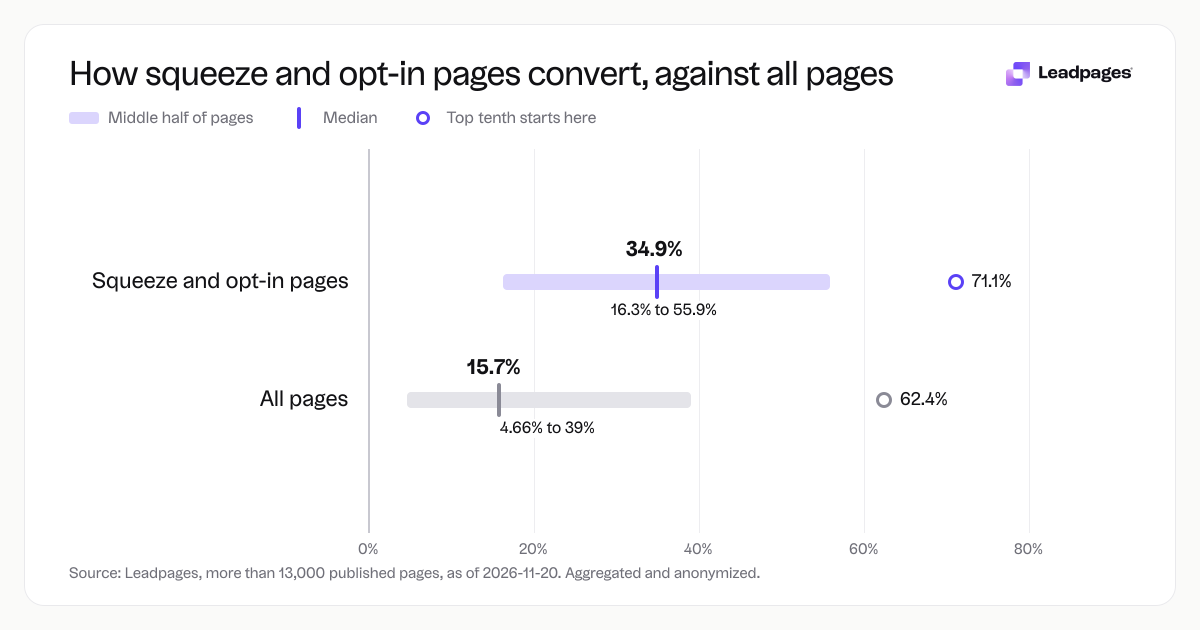
Conversion rates for squeeze and opt-in pages published with Leadpages, compared with all pages
more than 13,000 published pagesAs of November 20, 2026
34.9%
Median conversion rate, squeeze and opt-in pages
16.3%
Bottom quarter converts below, squeeze and opt-in pages
55.9%
Top quarter converts above, squeeze and opt-in pages
| Measure | Value |
|---|---|
| Median conversion rate, squeeze and opt-in pages | 34.9% |
| Bottom quarter converts below, squeeze and opt-in pages | 16.3% |
| Top quarter converts above, squeeze and opt-in pages | 55.9% |
| Top tenth converts above, squeeze and opt-in pages | 71.1% |
| Share converting at 10% or better, squeeze and opt-in pages | 83.2% |
| Median conversion rate, all pages | 15.7% |
| Bottom quarter converts below, all pages | 4.66% |
| Top quarter converts above, all pages | 39% |
| Top tenth converts above, all pages | 62.4% |
| Share converting at 10% or better, all pages | 59.9% |
Median conversion rate, squeeze and opt-in pages
Bottom quarter converts below, squeeze and opt-in pages
Top quarter converts above, squeeze and opt-in pages
Top tenth converts above, squeeze and opt-in pages
Share converting at 10% or better, squeeze and opt-in pages
Median conversion rate, all pages
Bottom quarter converts below, all pages
Top quarter converts above, all pages
Top tenth converts above, all pages
Share converting at 10% or better, all pages
Based on more than 13,000 published pages. As of November 20, 2026.
What lead capture is and how it works
Lead capture is a simple trade. You give your audience something they want, and they give you permission to contact them. That offer is your lead magnet. It can be a discount code, a short guide, a checklist, a trial, an assessment, or a consultation.
You promote the offer and send people to a page that explains it clearly and includes a form. When a visitor fills out the form, you have a lead. From there you can send helpful emails, make a phone call, or add the contact to a simple sales sequence. The process is direct and measurable, and it fits almost any business.
A local bakery could offer a free dozen doughnuts on a first order. A real estate agent could offer a home valuation report. A SaaS company could offer a 14-day free trial. The mechanics stay the same: one specific page, a clear promise, and a short form.
How to capture leads: a step-by-step process
1. Choose a lead magnet your audience wants
Pick something specific, useful, and quick to consume. Strong lead magnets solve a small but painful problem or let someone try your product before buying. Avoid generic offers like “subscribe to our newsletter.” Give people a reason to hand over their email now.
2. Build a dedicated landing page
Do not send people to your homepage or a general contact page. A landing page built for one offer removes distractions and keeps attention on the form. Across pages published with Leadpages, the median conversion rate for squeeze and opt-in pages (pages that exist only to capture a lead) is 34.9%. For all page types, the median is 15.7%. The top quarter of squeeze and opt-in pages convert above 55.9%, and the top tenth convert above 71.1%.
This shows that a page designed for lead capture tends to beat a multipurpose page. Use a page builder like the Leadpages landing page builder to make a simple page with a strong headline, a few lines of copy, an image or short video, and a form.
3. Add a form that asks only what you need
Every extra field can cause drop-off. Ask for an email and maybe a first name. Collect a phone number only if you plan to call. Use a tool like lead capture forms to build a clean form that submits fast. For research on field count and conversions, see our form fields conversion rate data.
4. Drive traffic to the page
Send traffic from paid ads, social posts, emails, or search. Match your ad copy or social caption to the landing page headline. When the message stays consistent from click to page, visitors are less likely to bounce.
5. Measure and improve
Once the page is live, track visits and form submissions. If the conversion rate is low, test changes. Run an A/B test with A/B testing in Leadpages. Try a different headline, a shorter form, or a different button color. Use the free A/B test significance calculator to know when you have enough data to pick a winner.
Small, steady improvements compound over time. Keep testing, keep notes on what helped, and apply those wins to other pages.
Common lead capture problems (and how to fix them)
People land but don’t submit the form
Likely causes: the offer is weak, the form asks for too much, or the page lacks trust signals. Run your page through a free landing page analyzer to get a score and a list of clear fixes. Also test your headline with the headline analyzer to see if it grabs attention and matches the offer.
Strengthen the offer copy so the value is obvious. Reduce fields. Add a brief testimonial, star rating, or a simple privacy note near the form.
Your page isn’t getting enough traffic
Check your promotion channels. If you run ads, review targeting and creative. If you rely on organic social, test different platforms or boost posts. Without traffic, even a well-built page will not produce many lead captures.
Create two or three ad variants and rotate them. Match each to a tight audience and send all versions to the same landing page. This lets you see which message pulls in qualified clicks.
Leads look right but never become customers
Your lead magnet may attract the wrong audience. If you give away a generic kitchen gadget and sell high-end cookware, you may pull in bargain hunters who will not buy. Tighten your offer to fit your ideal customer.
Shift from broad freebies to focused value. For the cookware store, try a “Chef’s guide to pan care” and a 10-minute consult to help pick the right pan. People who want that guide are closer to buying.
The page converts on desktop but fails on mobile
All Leadpages templates are mobile-responsive, but you should still preview and adjust the mobile view. Images that look great on a large monitor can crowd a phone screen. Shorten your headline and reduce spacing for mobile if needed.
Keep key content high on the page. Put the form and the main benefit within the first few scrolls. Test your button size and contrast on a real phone.
You collect emails but never follow up
Many leads go cold because no one follows up. Set an automated email to send within minutes of the submission. Welcome the person, deliver the lead magnet, and set expectations for what comes next.
Create a simple sequence. For example: day 0, deliver the guide; day 2, a tip that builds on the guide; day 5, a soft offer with a clear next step.
After you start capturing leads: what to do next
With a steady stream of lead captures, the next job is to nurture them. Send a short series of emails that give value without a hard sell. A fitness studio might send three emails: one with the class schedule, one with a member success story, and one with a limited-time membership offer.
Keep testing your landing page. What worked last month may slip as seasons or audiences change. Run fresh A/B tests every few weeks. As your list grows, build more lead capture pages for different products, audiences, or campaigns. For a broader plan to scale your efforts, see how we help with lead generation.
Use Leadpages to build landing pages that capture leads. Start building free.
The conversion rate figures above come from aggregated and anonymized data across more than 13,000 published pages, as of 2026-11-20.