
Landing page benchmarks
Form Fields Conversion Rate: How Field Count Affects Your Submissions
See how field count and phone number inclusion affect form conversion rates. Data from over 5,700 Leadpages pages shows which form lengths get the most submissions.
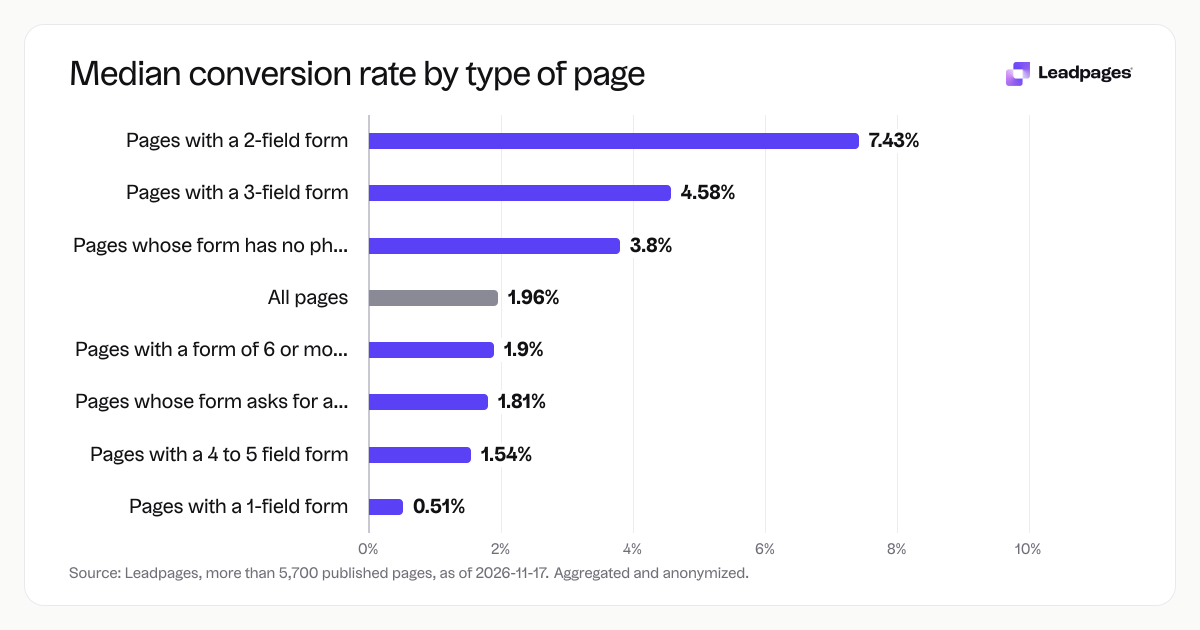
The number of form fields on your page changes how many visitors submit. Across more than 5,700 landing pages built with Leadpages, 2-field forms had the highest median conversion rate at 7.43%, while 1-field forms landed at 0.51%. The pattern holds for phone numbers, too: pages that asked for a phone had a median of 1.81%, compared to 3.8% when the form skipped the phone field.
Leadpages data
Form conversion rates for pages published with Leadpages, by number of form fields, over the 90 days to 2026-11-16. A form conversion rate is the share of visits to a page in which the visitor submitted its form. Each figure is a median or quartile across pages. It describes the pages in a group, not what causes the difference between groups.
more than 5,700 published pagesAs of November 17, 2026
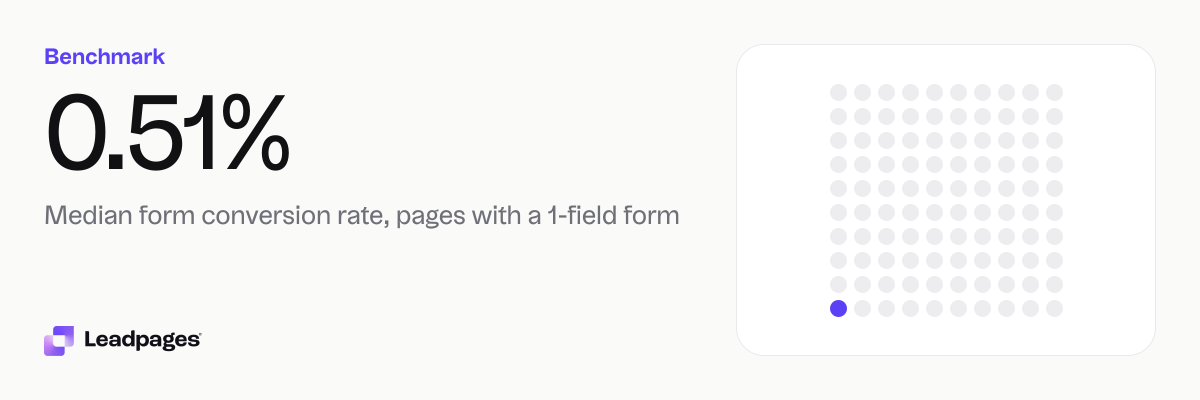
0.51%
Median form conversion rate, pages with a 1-field form
7.43%
Median form conversion rate, pages with a 2-field form
4.58%
Median form conversion rate, pages with a 3-field form
| Measure | Value |
|---|---|
| Median form conversion rate, pages with a 1-field form | 0.51% |
| Median form conversion rate, pages with a 2-field form | 7.43% |
| Median form conversion rate, pages with a 3-field form | 4.58% |
| Median form conversion rate, pages with a 4 to 5 field form | 1.54% |
| Median form conversion rate, pages with a form of 6 or more fields | 1.9% |
| Median form conversion rate, pages whose form has no phone field | 3.8% |
| Median form conversion rate, pages whose form asks for a phone number | 1.81% |
| Median form conversion rate, all pages | 1.96% |
Median form conversion rate, pages with a 1-field form
Median form conversion rate, pages with a 2-field form
Median form conversion rate, pages with a 3-field form
Median form conversion rate, pages with a 4 to 5 field form
Median form conversion rate, pages with a form of 6 or more fields
Median form conversion rate, pages whose form has no phone field
Median form conversion rate, pages whose form asks for a phone number
Median form conversion rate, all pages
Based on more than 5,700 published pages. As of November 17, 2026.
The short answer on field count and form conversion rates
If you want more form submissions, start with two fields—no more, no less. The median conversion rate for 2-field forms was 7.43%, more than three times the overall median of 1.96%. That doesn’t mean every 2-field form will match it, but it’s the clear high point in the data. Adding a third field dropped the median to 4.58%, and going to 4 or 5 fields brought it down to 1.54%. Even the 1-field forms, which seem simplest, only reached 0.51%. The takeaway: shorter isn’t always better, and context matters. Your offer and page clarity do a lot of the work.
A closer look at the numbers: median rates by field count
All figures are medians across pages published with Leadpages during the 90 days to November 16, 2026. A median marks the midpoint—half of the pages in that group converted higher, half lower.
- 1‑field form: 0.51%
- 2‑field form: 7.43%
- 3‑field form: 4.58%
- 4 to 5 fields: 1.54%
- 6 or more fields: 1.9%
The gap between 2-field and 1‑field forms can look surprising. One‑field forms are often simple email‑only fields on lower‑intent pages, like a basic “subscribe” pop‑up or a page that doesn’t explain the value. A 2‑field form is more likely to appear on a dedicated landing page where visitors expect to exchange a bit more information for something specific.
The phone number effect
We also separated pages into those that ask for a phone number and those that don’t.
- Forms without a phone field: 3.8% median conversion rate
- Forms that ask for a phone number: 1.81% median conversion rate
Requesting a phone number nearly halves the median conversion rate. Ask for a phone only if your sales process depends on it. If your team can start conversations over email, leave the phone field out.
The big picture
Across all pages in the sample, the median conversion rate was 1.96%. That’s the floor for the top half of all pages. If your own form conversion rate sits below that, aim to move closer to the numbers seen with shorter, phone‑free forms.
What pages in the top quarter do differently
While this dataset reports medians for groups, not individual-page rates, the patterns point to clear moves high‑converting pages use. They don’t try to gather everything in one go. They:
- Stick to 2 or 3 fields to reduce friction.
- Remove the phone field unless it’s tied directly to a scheduled call or demo.
- Align the form fields with the promise in the headline and the value delivered after submit.
A high‑performing page also makes the form the obvious next step. It limits navigation, keeps copy focused on one goal, and uses a clear call to action like “Get the guide” or “Start free trial.” Field count alone won’t fix a confusing page. Run your page through our free landing page analyzer to check clarity, readability, and trust. The tool points out gaps that often cost you submissions.
How to interpret your own form conversion rate
These benchmarks are medians from thousands of real pages, not a hard target. Your page’s conversion rate depends on your traffic source, offer, and industry. Use the numbers as a starting point for self‑assessment, not a universal grade.
- Compare within your own journey. If your form has 3 fields and your conversion rate trails the 4.58% median for 3‑field forms, there’s room to test.
- Watch the gap between devices. A form that works on desktop might underperform on mobile. Check your analytics to see where drop‑offs occur.
- Test the phone field. If you’re asking for a phone number and your rate is lower than the 1.81% median, try removing it for a two‑week test.
The goal isn’t to match a number. It’s to keep improving your own result in steady steps. Small changes—tightening labels, removing a field, or rewriting the button copy—can move the needle. Use A/B testing to confirm which version of your page brings in more qualified leads, not just more clicks.
How we gathered these benchmarks
The figures come from form conversion rates on pages published with Leadpages. A form conversion rate is the share of visits to a page in which the visitor submitted its form. All data covers a trailing 90‑day period ending November 16, 2026, and includes more than 5,700 published pages. The sample is aggregated and anonymized.
We report medians, not averages, to avoid skew from extreme values. Each median describes the pages in a specific group—for example, all pages with a 2‑field form—and tells you where the middle page landed. It doesn’t assign a cause for the difference between groups. The patterns you see across field counts and the presence of a phone field reflect the pages as they existed, without controlling for traffic source, audience, or page quality.
Because the data comes from pages built on Leadpages, the sample spans lead‑gen pages, webinar registrations, product sign‑ups, and more. The mix helps explain why a 1‑field form sometimes performs below expectation: many of those forms sit on pages that don’t make a strong offer. The lesson isn’t to avoid 1‑field forms entirely. It’s to pair any form length with a page worth filling out.
If you’re just getting started with forms, the Leadpages landing page builder lets you add a multi‑step or inline form in minutes, with no code. You can pick from proven templates in the template gallery and adjust your form fields as your goals change.
Score your landing page with our free landing page analyzer.